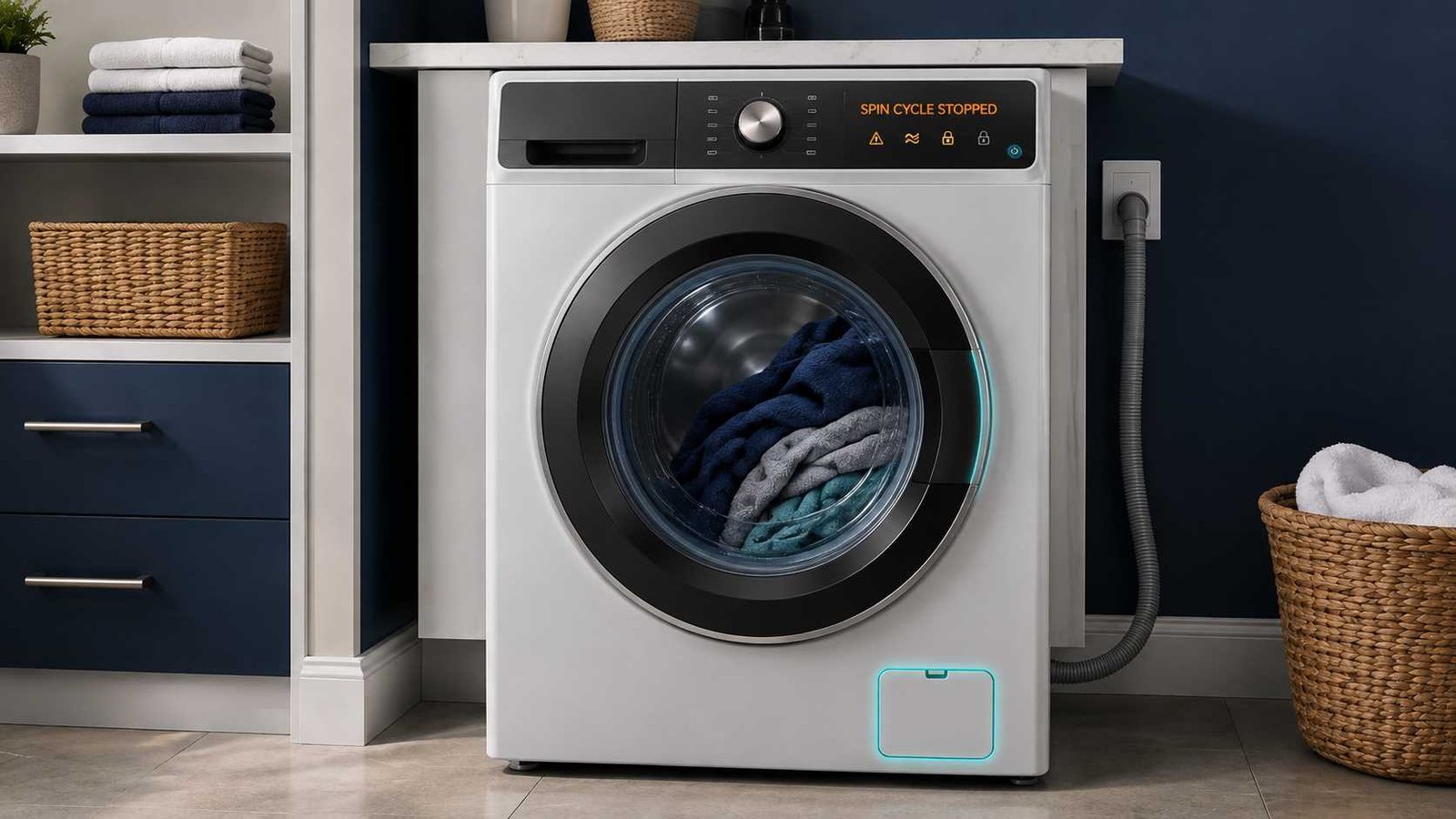
 A washing machine that stops during the spin cycle is most commonly reacting to an unbalanced load or water that has not drained completely. The washer may slow down, pause, add water, redistribute the clothes, or refuse to reach full spin speed.
Start by checking whether water remains inside the drum. If the drum is mostly empty, pause the machine and redistribute the laundry. If water is still present, inspect the visible drain hose and clean the accessible pump filter only when your model’s manual provides instructions.
Stop using the washer immediately if you notice a burning smell, smoke, sparking, repeated breaker trips, leaking near electrical parts, or violent movement. Do not force open a locked door or attempt internal electrical testing.
Quick Answer
| Item | Details |
|---|---|
| Problem | Washing machine begins spinning but stops, pauses repeatedly, or fails to complete the final spin |
| Most likely cause | Unbalanced, overloaded, or unsuitable laundry load |
| Other common cause | Water is not draining quickly enough |
| First safe check | Check for standing water, then redistribute or reduce the load |
| Possible error types | Imbalance, drainage, excess-suds, door-lock, motor, or power errors |
| Repair difficulty | Often easy when caused by loading, levelling, detergent, or an accessible filter |
| Can the washer still be used? | Only after the cause is corrected and no serious noise, smell, leakage, or electrical problem is present |
| Professional help required | When the fault returns with balanced loads, the washer cannot drain, the drum does not turn, or a lock, motor, sensor, or control error returns |
Why Does a Washing Machine Stop During the Spin Cycle?
Modern washing machines monitor drum balance, water level, door or lid position, and motor operation before allowing high-speed spinning.
When the load is uneven, the machine may stop spinning to prevent excessive vibration. Samsung states that an unbalanced washer may spin slowly, stop during the cycle, or display an error. LG washers may add water, agitate the load, drain, and try spinning again while attempting to correct an imbalance.
The washer may also stop if it detects water remaining in the tub. High-speed spinning with a significant amount of water inside would place additional strain on the appliance and leave clothes wet. A blocked pump filter, kinked drain hose, restricted household drain, or failing pump can all contribute to poor drainage.
Is the Washer Actually Stuck?
A short pause during spin does not always mean the washer has failed.
The machine may be:
- Measuring the load
- Waiting for the drum to stop before unlocking
- Redistributing uneven laundry
- Adding water to separate tangled items
- Running an extra rinse because of excess suds
- Recalculating the estimated cycle time
On supported LG top-load models, the washer may attempt to rebalance the load several times before displaying a final UE error. Some Samsung models may also refill and retry the spin when an unbalanced-load condition is detected.
Electrolux explains that an excess-suds condition can make the washer perform additional rinses until the foam has cleared. This can make the cycle appear stuck or much longer than expected.
However, the washer probably has a fault if it remains at the same stage for an unusually long time, repeatedly stops with every load, displays an error, leaves standing water, loses power, or produces abnormal noise.
Check What Happens When the Washer Stops
The condition inside the machine provides the most useful clue.
| What you observe | Most likely direction |
|---|---|
| Water remains in the drum | Check drainage first |
| Drum is empty but clothes are wet | Check load balance, spin setting, levelling, and door lock |
| Washer bangs or moves before stopping | Uneven load, unstable installation, or possible suspension problem |
| Washer adds water and tries again | It may be attempting to rebalance the load |
| Display remains on with an error | Record the exact code and check the model manual |
| Display goes completely blank | Check the power supply and stop if a breaker has tripped |
| Washer hums but does not drain | Possible obstruction or drain-pump problem |
| Washer works empty but stops with laundry | Load size, load type, or suspension may be involved |
| Door or lid will not lock | Lock mechanism or alignment may be preventing spin |
Common Reasons a Washer Stops During Spin
1. The Laundry Is Unbalanced
Laundry can gather on one side of the drum, especially when washing towels, bedding, bath mats, jackets, or other heavy items.
The washer may repeatedly accelerate and slow down as it tries to distribute the weight. If it cannot balance the load, it may stop the spin entirely.
Samsung, LG, Whirlpool, and Maytag all identify uneven loads as a common reason for poor spinning, excessive shaking, wet clothes, or a cycle that stops.
2. The Drum Is Overloaded
A tightly packed drum does not leave enough space for laundry to move and distribute itself.
Remove several items if:
- The drum is packed firmly
- Large items cannot move freely
- Wet laundry forms one heavy mass
- The machine stops only with full loads
Do not use the washer’s physical drum size alone to judge capacity. Maximum load limits and programme capacities vary by model.
3. The Load Is Too Small
One towel, one bath mat, one pillow, or another single absorbent item can become much heavier on one side after absorbing water.
Add a few similar items when permitted by the care labels, or remove the item and use a more suitable washing method. LG notes that both overly bulky and very small loads can create an imbalance.
4. The Washer Is Not Level
All four feet should make firm contact with a solid floor. A machine that rocks when pressed at the corners may become unstable as spin speed increases.
Samsung advises checking that the washer is level and installed on a stable surface when spinning is poor or an imbalance code appears.
Do not attempt to restrain a moving washer while it is operating.
5. Water Is Not Draining
A washer may stop before or during high-speed spin when it cannot remove the water.
Common drainage causes include:
- Kinked or compressed drain hose
- Clogged accessible pump filter
- Blocked household drain or standpipe
- Incorrect drain-hose installation
- Foreign material in the drainage path
- Frozen hose in very cold conditions
- Weak or failed drain pump
LG identifies a kinked drain hose and clogged pump filter as common causes of its OE drainage error. Bosch similarly links E18 errors with a blocked pump or restricted drain hose.
6. Too Much Detergent Was Used
Excess detergent can create more foam than the washer can remove during its normal rinse sequence.
High-efficiency machines generally require the detergent type and quantity specified in the manual. Oversudsing can produce additional rinses, long pauses, poor draining, or a suds-related code.
Using more detergent does not normally clean clothes better.
7. The Door or Lid Is Not Locking
Front-load washers must confirm that the door is securely locked before spinning. Many top-load machines use a lid switch or lid lock for the same safety purpose.
GE explains that a top-load lid switch prevents agitation or spinning when the lid is raised. On applicable models, a damaged, obstructed, or misaligned lid lock can prevent the washer from completing the spin cycle.
Do not bypass, tape down, or manually defeat a door or lid safety switch.
8. The Selected Programme Uses a Low Spin
Delicate, hand-wash, wool, and similar programmes may use reduced spin speeds or shorter spin periods.
Check that:
- No-spin was not selected
- A low-spin option was not chosen
- The programme is suitable for the load
- The cycle was not paused or modified accidentally
Maytag notes that gentle and delicate cycles intentionally use slower spins to protect fabrics.
9. The Power Was Interrupted
If the control panel becomes completely blank, check whether other devices on the same supply still have power.
Do not repeatedly reset a tripped circuit breaker. A breaker that trips again, a damaged plug, a hot outlet, or a burning smell requires professional electrical assessment.
10. An Internal Part May Be Faulty
When basic checks do not help, possible causes include:
- Drain pump
- Door-lock or lid-lock assembly
- Suspension rods or shock absorbers
- Drive belt or coupling on applicable models
- Motor
- Motor-speed or position sensor
- Wiring connection
- Water-level sensing system
- Electronic control
These are possible causes, not confirmed diagnoses. Internal electrical measurements, component bypassing, and major disassembly should be left to a qualified technician.
Safe Step-by-Step Troubleshooting
Step 1: Allow a Brief Balancing Attempt
Watch and listen before cancelling the programme.
If the washer slowly turns, pauses, adds water, or tries spinning again, it may be redistributing the load. Let it complete a reasonable balancing attempt unless it begins banging, moving, or displaying an error.
Step 2: Record the Display
Take a photo of:
- The error code
- Flashing lights
- Remaining time
- Selected programme
- Spin-speed setting
Codes vary by manufacturer, model, region, and control-panel design. A code should always be checked against the exact model manual.
Step 3: Pause and Wait for the Drum to Stop
Do not pull on the door while the drum is moving.
A top-load washer may take several minutes to coast to a complete stop before releasing the lid. GE states that selected models may take up to about three minutes to stop and unlock after being paused during spin.
If water remains above the bottom of a front-load door, do not force it open.
Step 4: Redistribute the Laundry
Once the door or lid unlocks safely:
- Untangle sheets and large garments.
- Spread the laundry evenly.
- Remove several items if the drum is tightly packed.
- Avoid spinning one heavy absorbent item by itself.
- Restart a drain-and-spin or spin-only programme if the manual permits it.
Step 5: Check Whether the Washer Rocks
With the machine switched off:
- Press gently on opposite top corners.
- Check whether the cabinet rocks.
- Confirm that all feet contact the floor.
- Look for a weak, flexible, or uneven floor surface.
Follow the installation manual before adjusting levelling feet. Do not place loose objects under the feet.
Step 6: Check for Standing Water
If water remains inside, focus on drainage before load balance.
Look through the door or into the tub and check whether:
- The water level is clearly visible
- The washer makes a draining sound
- Water enters the household drain
- A drain-related code appears
- The door remains locked because water is detected
Step 7: Inspect the Visible Drain Hose
Switch off and unplug the appliance before moving it.
Check that the hose is not:
- Crushed against the wall
- Folded sharply
- Twisted
- Frozen
- Pushed incorrectly into the drain
- Surrounded by overflowing wastewater
Do not change the drain-hose height or connection method without checking the installation manual. Requirements vary by model and country.
Step 8: Clean the Accessible Pump Filter
Some front-load washers have a user-accessible drain-pump filter behind a small lower cover. Many top-load models do not provide the same access.
Only clean it when your owner’s manual describes the procedure.
Before opening:
- Switch off and unplug the washer.
- Allow hot wash water to cool.
- Prepare shallow containers and towels.
- Drain residual water slowly using the provided hose where fitted.
- Keep children away from the area.
LG warns that residual water may be hot when opening the filter area.
Do not remove panels or reach into the internal pump area.
Step 9: Check Detergent Use
Confirm that:
- The detergent is suitable for the washer
- The correct compartment was used
- The dose matches the load and water conditions
- Concentrated detergent was measured correctly
- No additional detergent was added after the machine began correcting suds
A rinse-and-spin programme may help clear remaining foam, but follow the manual.
Step 10: Run a Controlled Test
After correcting the visible cause:
- Run a drain-and-spin or spin-only programme.
- Stay nearby during the test.
- Stop the machine if it moves, bangs, leaks, or smells hot.
- Note whether it drains normally.
- Check whether it reaches full spin speed.
An empty test that completes successfully but a normal load that fails points more strongly toward loading, balance, programme choice, or suspension behaviour.
What If Water Remains Inside?
Standing water changes the troubleshooting direction.
Do not keep restarting the spin programme. First check the drain hose and accessible filter. If the pump runs but water leaves very slowly, there may be a partial obstruction in the machine or household drain.
Arrange service when:
- The pump only hums
- No water leaves the machine
- The filter is clear but the fault remains
- The drain code returns
- Water leaks from underneath
- The pump sounds unusually loud
- The filter cannot be opened safely
- The washer must be dismantled to reach the obstruction
What If the Washer Drains but Stops at High Speed?
When no water remains, investigate load balance and mechanical stability.
Check for:
- One-sided or tangled laundry
- Excessive load size
- One heavy item
- Washer rocking on the floor
- Loud knocking as speed increases
- Drum movement that appears excessive
- Grinding, scraping, or roaring sounds
Repeated failure with small, balanced loads may indicate a suspension, bearing, motor, sensor, belt, coupling, or control problem. Further diagnosis should be carried out by a technician.
Should You Reset the Washing Machine?
A reset can clear a temporary control condition, but it does not repair a blocked drain, uneven load, defective lock, or failing component.
Samsung explicitly notes that resetting clears stored error information but does not automatically correct the fault that caused it.
Power-cycle instructions also vary. Samsung gives a 30-second power interruption for selected motor-code troubleshooting, while Whirlpool describes a five-minute disconnection for many models. Follow the owner’s manual for the exact washer rather than assuming one universal reset time.
Do not repeatedly reset the washer when:
- A breaker trips
- A burning smell is present
- The drum does not turn
- Water leaks
- An internal fault code returns
- The washer moves violently
Error Codes That May Appear
The following are examples only. Meanings and formats vary by model and country.
| Brand | Example code | General meaning |
|---|---|---|
| Samsung | Ub, UE, Ur or related code | Load is unbalanced or the washer is attempting to rebalance |
| Samsung | 5C or 5E | Water is not draining correctly |
| Samsung | Sud, SUd or related code | Excessive foam detected |
| LG | uE, UE or Ub | Washer is attempting to balance or cannot balance the load |
| LG | OE | Water is not draining |
| LG | dE or dL on selected models | Door or lid locking problem |
| Bosch | E18 or F18 on selected models | Drainage is restricted or the pump area requires attention |
Samsung’s official code guidance identifies 5C/5E as drainage codes, Ub/UE as spin or balance conditions, and Sud as excessive foam. LG identifies UE/Ub with imbalance and OE with failure to drain.
Possible Faulty Parts
| Possible part | Typical associated symptom | Recommended action |
|---|---|---|
| Drain pump | Water remains, humming, drain error | Check user-accessible drainage points, then arrange service |
| Door or lid lock | Lock error, repeated clicking, no spin | Check for obstruction or misalignment; do not bypass it |
| Suspension components | Severe movement or repeated imbalance | Stop using the washer and arrange inspection |
| Drive belt or coupling | Drum does not turn or slips on applicable models | Technician diagnosis |
| Motor or speed sensor | Drum starts then stops, motor-related error | Technician diagnosis |
| Water-level system | Washer incorrectly detects retained water | Technician diagnosis |
| Electronic control | Multiple unexplained errors or incomplete commands | Technician diagnosis after other causes are excluded |
Not every washing machine uses the same drive system. Do not order parts based only on the symptom.
Stop Using the Washer Immediately If
Stop the cycle, disconnect power when safe, and arrange professional help if you notice:
- Burning or electrical smell
- Smoke, sparking, or melted material
- Repeated circuit-breaker tripping
- Water reaching the plug or electrical supply
- Severe banging or cabinet movement
- Loose or visibly displaced drum
- Grinding or metal-on-metal scraping
- Cracked door glass
- Significant leakage underneath
- Damaged power cable or plug
Samsung advises switching off a washer immediately when a burning smell occurs.
When to Call a Technician
Professional diagnosis is appropriate when:
- The washer stops during every spin cycle
- Balanced, moderate loads do not help
- The washer cannot drain after the hose and accessible filter are checked
- A drain, lock, motor, sensor, or control error returns
- The drum does not turn during washing or spinning
- The washer works empty but fails with every normal load
- Loud grinding, scraping, roaring, or knocking continues
- The lid or door cannot lock
- The washer loses power during high-speed spin
- An internal part or panel must be removed
Provide the technician with the model number, serial number, exact error code, cycle selected, load type, and a description of when the washer stops.
How to Prevent Future Spin-Cycle Stops
- Mix large and small garments so weight can distribute more evenly.
- Avoid washing one heavy absorbent item by itself.
- Do not pack the drum tightly.
- Use the programme intended for bedding or bulky items.
- Confirm that the washer remains level.
- Measure detergent instead of pouring it freely.
- Clean the pump filter at the interval stated in the manual.
- Check pockets for coins and small objects.
- Keep the visible drain hose free from crushing and sharp bends.
- Investigate new vibration or noise before it becomes severe.
Frequently Asked Questions
Why does my washing machine stop with one minute remaining?
The washer may be trying to balance the load or remove the final amount of water. Estimated time can remain unchanged while the machine performs these checks. If it stays there repeatedly, inspect the load and drainage system.
Can a blocked filter stop the spin cycle?
Yes. A clogged pump filter can restrict drainage, and the washer may refuse high-speed spin while water remains. Only open the filter when your model provides user-access instructions.
Why does my washer add water during the spin cycle?
Some models add water and move the laundry to correct an imbalance. This can be normal during a balancing attempt. Repeated attempts that end with an imbalance code mean the load needs attention.
Why does the washer work empty but stop with clothes inside?
That pattern often points to an unsuitable, overloaded, or unbalanced load. It can also indicate weakened suspension or another fault that only becomes apparent under load.
Can too much detergent stop a washer from spinning?
Excess foam can cause additional rinsing, extended cycle time, poor drainage, or a suds error. Use the detergent type and amount specified for the appliance.
Why is the washer door still locked?
The washer may still detect water, the drum may still be moving, or the lock may need time to release. Do not force the door. Run a drain programme if appropriate or follow the emergency-drain instructions in the model manual.
Is it safe to keep restarting the spin cycle?
One controlled restart after correcting the load or drainage issue is reasonable. Repeatedly restarting a washer that bangs, smells hot, leaks, trips power, or displays the same fault can cause further damage.
How do I know whether the motor has failed?
A motor problem cannot be confirmed from the symptom alone. Possible signs include a drum that will not turn, a motor-related error, unusual humming, or repeated stopping after basic checks. Accurate diagnosis usually requires technician testing.
Daniel Brooks is a US-based appliance troubleshooting researcher with 12 years of experience studying washer, dryer, refrigerator, and dishwasher faults. He reviews manufacturer manuals and converts technical error codes into safe, practical guidance for homeowners.