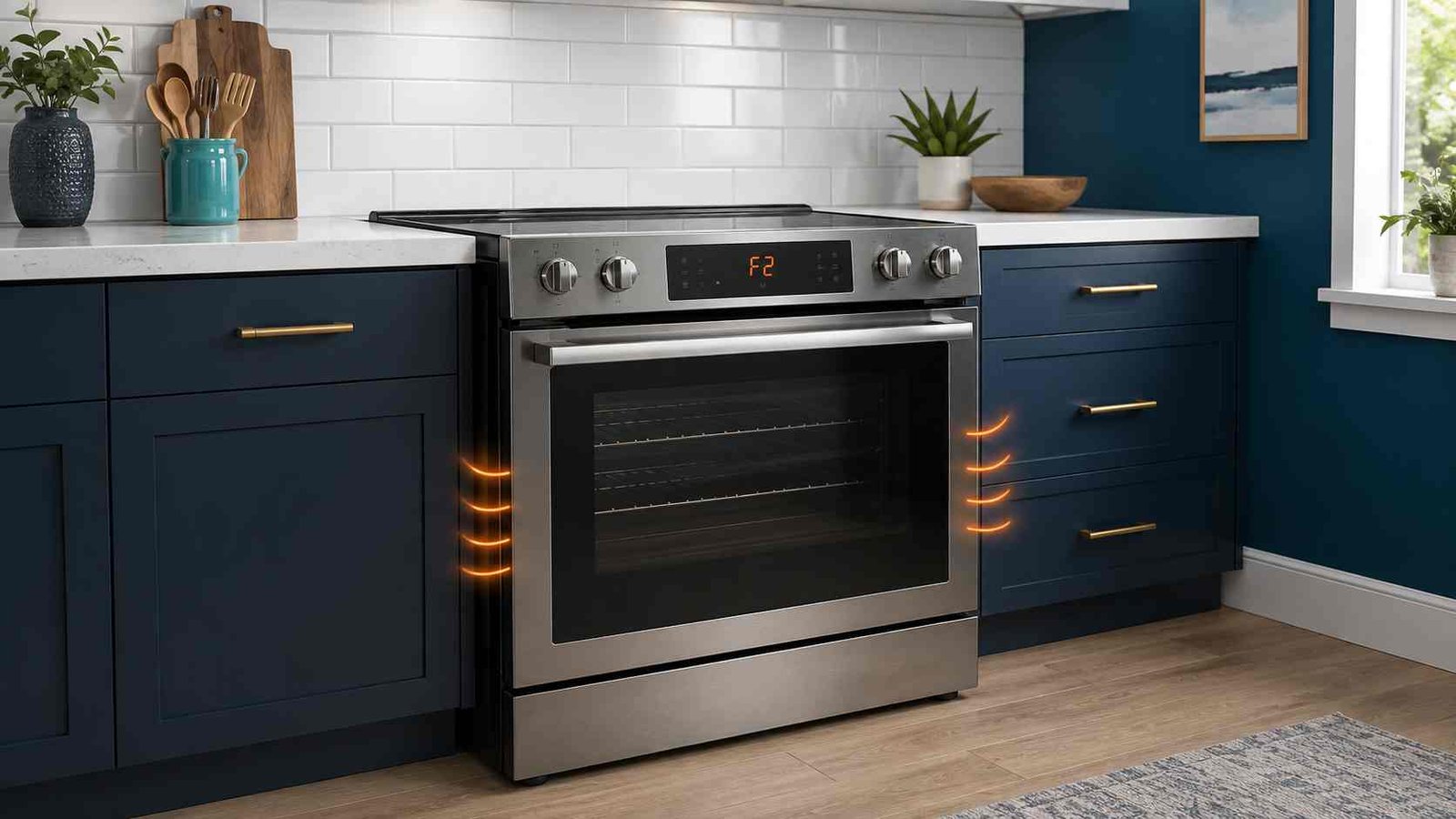
 A GE oven F2 error code, sometimes displayed as F20, means the electronic control detected that the oven temperature exceeded a preset threshold. Press Clear/Off or Cancel, stop the cooking or self-cleaning cycle and allow the oven to cool.
If the oven continues heating, smells unusually hot, produces smoke or does not respond to its controls, switch off its circuit breaker and do not use the oven until it has been inspected.
A power reset may clear a temporary control error, but it does not repair the condition that caused the oven to report excessive temperature. GE recommends professional diagnosis when the code returns. The meaning also differs on GE Advantium and microwave ovens, so identifying the exact appliance and model is important.
GE Oven F2
| Item | Details |
|---|---|
| Error code | F2 or F20 |
| Brand | GE Appliances |
| Appliance | Conventional range or wall oven |
| Confirmed meaning | Oven temperature exceeded a preset threshold |
| Safe first action | Cancel the cycle and let the oven cool |
| Basic reset | Disconnect power for one or two minutes |
| Safe to keep using? | Not when the code returns or heating is uncontrolled |
| Does F2 prove the sensor is bad? | No |
| Repair difficulty | Professional diagnosis may be required |
| Important exception | F2 means a shorted thermal sensor on GE Advantium and microwave ovens |
GE’s general range and wall-oven code list does not identify one specific failed component behind F2. It states that the oven exceeded a preset temperature threshold for an unknown reason.
What Does the F2 Code Mean on a GE Oven?
On a conventional GE range or wall oven, F2 or F20 indicates an excessive-temperature condition detected by the electronic oven control.
The code tells you what the control detected. It does not, by itself, confirm why the condition occurred.
This distinction matters because many repair pages immediately blame the oven-temperature sensor. However, GE lists its general oven-sensor faults separately as F3 and F4 on many electronic ranges and wall ovens. GE also assigns separate codes to selected control, key-panel, cooling-fan and door-lock faults.
Therefore, replacing a sensor, control board or another part based only on an F2 display may not solve the problem.
The exact temperature that activates F2 is not published as one universal figure in GE’s current consumer support information. It is safer to describe it as a preset threshold rather than assume that every GE model uses the same temperature limit.
Stop Using the Oven in These Situations
Turn the oven off at the circuit breaker and arrange service when any of the following occurs:
- The oven continues heating after you press Clear/Off.
- The F2 code returns after one controlled reset.
- The display or controls become unresponsive.
- You notice smoke, scorching or an electrical burning smell.
- The breaker trips when the oven is switched on.
- The code appears repeatedly while the oven is idle.
- The oven door remains locked after the appliance has cooled.
- The appliance becomes excessively hot around the controls or nearby cabinets.
Do not open an access panel, touch internal wiring or attempt live-voltage testing. Both gas and electric ranges contain electrical circuits that can remain hazardous during internal diagnosis.
GE recommends leaving a range or wall oven switched off at its circuit breaker until it is serviced when a fault code will not clear.
Gas safety warning: If you smell gas, do not operate switches or attempt an oven reset. Leave the area and follow the emergency instructions supplied by your gas utility.
What Can Cause a GE Oven F2 Code?
GE’s public range and wall-oven code list does not specify the failed part responsible for F2. It describes only the detected excessive-temperature condition.
The underlying issue must therefore be diagnosed rather than assumed.
The Oven Actually Became Too Hot
F2 may appear because the oven genuinely exceeded the temperature limit monitored by its control system.
This may happen during:
- Normal baking
- Broiling
- A long high-temperature cooking cycle
- Self-cleaning
- A condition in which heating does not stop correctly
The oven may feel unusually hot, overcook food or continue heating after cancellation. Disconnect the power immediately if the oven does not stop heating normally.
The Control Received an Incorrect Temperature Reading
It is also possible for the control to report an excessive-temperature condition when the oven does not appear unusually hot.
The code alone cannot determine whether:
- The cavity genuinely overheated
- The temperature-monitoring circuit produced an incorrect reading
- An electrical connection affected the reading
- The electronic control interpreted the signal incorrectly
These possibilities require model-specific testing by a qualified appliance technician. They should not be treated as confirmed diagnoses based on F2 alone.
The Code Appeared During Self-Cleaning
Self-cleaning operates at much higher temperatures than ordinary baking. GE ovens keep the door locked until the appliance has cooled sufficiently.
If F2 appears during self-cleaning:
- Press Clear/Off or Cancel.
- Do not force the door or its latch.
- Allow the oven to cool completely.
- Switch off the breaker if the cycle will not stop.
- Do not start another self-cleaning cycle until the fault has been resolved.
GE states that normal self-clean cooldown can take approximately 30 to 90 minutes. If the appliance remains in the cleaning cycle after 90 minutes and does not respond to Clear/Off, GE advises disconnecting power at the breaker or fuse box.
A Model-Specific Control Problem May Be Present
GE has produced many generations of ranges, wall ovens and combination cooking appliances. Different products use different control panels, sensors, locks and cooling systems.
That is why the complete model number is needed before:
- Interpreting additional symptoms
- Entering diagnostic mode
- Testing a component
- Ordering a replacement part
- Following a model-specific reset procedure
GE provides owner’s manuals and installation documents through its model-number lookup system.
Safe Checks Before Arranging Repair
These checks do not require opening the appliance.
1. Cancel the Current Operation
Press Clear/Off or Cancel once.
Watch whether:
- The heating indicator turns off
- The display changes
- The beeping stops
- The oven begins cooling
- The door remains locked because of a self-clean cycle
Do not repeatedly press buttons if the control is not responding.
2. Check Whether Heating Has Stopped
Stand clear of the appliance and observe it without touching hot surfaces.
If the oven continues producing intense heat after cancellation, switch off its dedicated circuit breaker. Do not wait for the fault code to disappear.
3. Allow the Oven to Cool
Leave the door closed if the oven is extremely hot or locked after self-cleaning.
Do not force a mechanical or automatic latch. GE states that an automatic self-clean lock remains engaged until the oven has cooled.
4. Check Visible Ventilation Areas
Look for anything covering the oven’s visible external vent area, such as:
- Foil
- Towels
- Baking sheets
- Oversized cookware
- Heavy grease accumulation
- Objects pushed against the rear of a freestanding range
Do not insert tools into a vent or remove a cover.
A running cooling fan is not automatically a fault. Many GE ranges and wall ovens use cooling fans to protect electronic controls, and the fan may continue running while the appliance cools.
5. Record When F2 Appears
Write down the operating conditions before resetting the oven:
- During preheating
- At a particular baking temperature
- During broiling
- During self-cleaning
- After cooking ended
- While the oven was idle
- Immediately after power was restored
This pattern may help the technician reproduce and diagnose the problem.
6. Find the Model Number
The rating plate location varies by appliance design. It may be around the oven-door frame, near the storage drawer opening or in another model-specific location.
Record the complete model number, including any letters or suffixes. GE uses model numbers to provide the correct manual, support information and parts diagrams.
How to Reset a GE Oven F2 Error Code
A reset is reasonable only when:
- The oven has stopped heating
- There is no smoke or burning smell
- The controls are not visibly damaged
- The appliance has had time to cool
- The breaker has not been repeatedly tripping
Standard Range or Wall-Oven Reset
- Press Clear/Off or Cancel.
- Switch the range or wall oven off at its circuit breaker or remove the appropriate fuse.
- Leave the power disconnected for one or two minutes.
- Restore power.
- Reset the clock if required.
- Do not immediately start a self-cleaning cycle.
- Use a normal cooking function only when the appliance appears safe and the code has cleared.
GE states that disconnecting the circuit breaker or fuse for a minute or two may clear an oven fault code. It also warns that the control may not reset and service may still be necessary.
What a Reset Can Do
A power reset can:
- Restart the electronic control
- Clear a temporary display condition
- Stop persistent fault-code beeping
- Confirm whether the code immediately returns
What a Reset Cannot Do
A reset cannot repair:
- An unresolved overheating condition
- A defective internal component
- Damaged wiring
- A control problem
- A door-lock failure
- A repeated temperature-monitoring error
Do not keep resetting the oven each time F2 returns. Repeatedly restoring power can hide the warning temporarily without correcting its cause.
What to Do When the Basic Reset Fails
F2 Returns Immediately
An immediate return suggests that the control still detects the fault condition.
Leave the oven switched off and arrange professional diagnosis. Do not enter an undocumented service mode or begin replacing parts based on the code alone.
F2 Returns During Preheating or Baking
Stop using the oven and note:
- The selected temperature
- How long the oven had been heating
- Whether food was overcooked
- Whether the heating indicator stayed on
- Whether the code appeared at the same stage previously
The repeating pattern can be more useful for diagnosis than the code alone.
F2 Appears While the Oven Is Idle
Disconnect power and arrange service. A temperature warning while the oven is not intentionally heating should not be ignored, even when the cavity feels cool.
F2 Appears During Self-Cleaning
Cancel the cycle and allow the oven to cool. Do not force the locked door and do not restart self-cleaning to test the appliance.
A door that remains locked after the oven has cooled may have a separate lock or control problem. GE advises against forcing the latch and recommends service if power-reset and cooling guidance do not release it.
F2 Returns After a Part Was Replaced
Do not assume that the replacement part is defective.
Possible explanations include:
- The original diagnosis was incomplete
- The replacement does not match the exact model
- Another part of the monitored circuit was not checked
- A connector or wiring problem remains
- The control still detects excessive temperature
Internal inspection should be completed by a technician using the model-specific documentation.
Does F2 Mean the Oven Sensor Is Bad?
Not necessarily.
For conventional GE ranges and wall ovens, GE defines F2 or F20 as an oven temperature exceeding a preset threshold. Its general list assigns F3 and F4 to conditions that usually mean the oven sensor needs replacement.
This does not rule out a problem somewhere in the temperature-monitoring system. It means only that F2 alone is not proof that the sensor must be replaced.
A technician may need to diagnose the appliance’s sensing and heating-control systems. The exact testing procedure depends on the model and should not be attempted with the appliance connected to mains power.
Do Not Use Oven Calibration as an F2 Fix
Oven calibration is intended to correct a consistent difference between the selected baking temperature and the results you observe during normal cooking.
It is not a repair for:
- An F2 or F20 fault
- Uncontrolled heating
- A recurring excessive-temperature warning
- A temperature error during self-cleaning
GE also notes that calibration procedures vary by control-panel design and do not affect self-cleaning or broiling temperatures.
Important Model Difference: GE Advantium F2
Do not apply the conventional range definition to a GE Advantium oven.
On both GE’s 120-volt and 240-volt Advantium fault-code lists, F2 means a shorted thermal sensor.
For a 120-volt Advantium, GE advises:
- Press Clear/Off or Cancel.
- Program the control again.
- If F2 returns, disconnect power for a minute or two.
- Restore power and retry the cooking function.
For a 240-volt Advantium, GE’s listed sequence includes a 30-second power disconnection after the code returns. Service is recommended when the fault cannot be cleared.
Because an Advantium includes microwave functions, do not remove its outer cover or attempt internal repairs. Microwave appliances can retain hazardous high voltage after being disconnected.
GE Microwave F2 Code
On a standard GE microwave, F2 also means a shorted thermal sensor, not the conventional range and wall-oven excessive-temperature definition.
GE states that disconnecting microwave power for 30 seconds may clear some codes, but trained service may be required.
Before following any F2 guide, confirm whether the appliance is a:
- Conventional range
- Wall oven
- Microwave
- Advantium speed-cooking oven
- Combination microwave and wall oven
Can You Still Use the Cooktop?
When an F2 code remains on a range, GE recommends switching the appliance off at the circuit breaker until it is serviced.
GE’s support guidance says the breaker may be temporarily restored to use the surface units and then switched off again.
However, do not use any part of the appliance when there is:
- A gas smell
- Smoke
- Scorched wiring odor
- Breaker tripping
- Visible electrical damage
- Heat coming from the oven when it should be off
For a gas range, remember that the electronic controls and ignition system may still depend on electrical power.
When to Call a Technician
Arrange professional service when:
- F2 returns after one power reset
- The oven keeps heating after cancellation
- The code appears while the oven is idle
- Food burns at ordinary settings
- The oven door will not unlock after cooling
- The display is blank, damaged or unresponsive
- The breaker trips repeatedly
- Internal electrical testing is required
- The appliance is an Advantium or microwave
- You cannot verify the correct model-specific instructions
A qualified technician can use the full model number, symptom pattern and service documentation to test the appropriate temperature-monitoring and heating-control circuits.
Do not order a control board or sensor only because another GE model with an F2 code required that part.
Frequently Asked Questions
How do I clear an F2 code on a GE oven?
Press Clear/Off, let the oven cool and disconnect its circuit breaker for one or two minutes. Restore power once. If F2 returns, leave the oven off and arrange service.
Is it safe to use a GE oven showing F2?
Do not continue using the oven if F2 remains, returns after resetting or is accompanied by uncontrolled heating, smoke or an unusual smell. GE recommends keeping the oven switched off at the breaker until service when the fault will not clear.
Are F2 and F20 the same GE oven error?
GE groups F2 and F20 together in its general range and wall-oven fault-code list. Both indicate that the oven temperature exceeded a preset threshold.
Why does my GE oven show F2 when it does not feel hot?
The control detected an excessive-temperature condition, but the code alone cannot establish whether the oven actually became too hot or the monitored information was incorrect. Model-specific diagnosis is required.
Can a power outage cause the F2 code?
A temporary electronic disturbance may clear after a power reset, but GE does not identify power outages as the universal cause of F2. Treat a returning code as an unresolved fault rather than repeatedly resetting it.
Should I replace the temperature sensor for an F2 code?
Not based on F2 alone. On conventional GE ranges and wall ovens, GE separately associates F3 and F4 with oven-sensor replacement. F2 means the oven exceeded a preset temperature threshold for an unknown reason.
What should I do if F2 appears during self-cleaning?
Cancel the cycle, let the oven cool and do not force the locked door. Switch off the breaker if the cycle will not stop. Do not run self-clean again until the problem has been diagnosed.
Why does F2 have a different meaning on my GE Advantium?
Advantium ovens use a different fault-code system. GE defines F2 on 120-volt and 240-volt Advantium products as a shorted thermal sensor.
Daniel Brooks is a US-based appliance troubleshooting researcher with 12 years of experience studying washer, dryer, refrigerator, and dishwasher faults. He reviews manufacturer manuals and converts technical error codes into safe, practical guidance for homeowners.