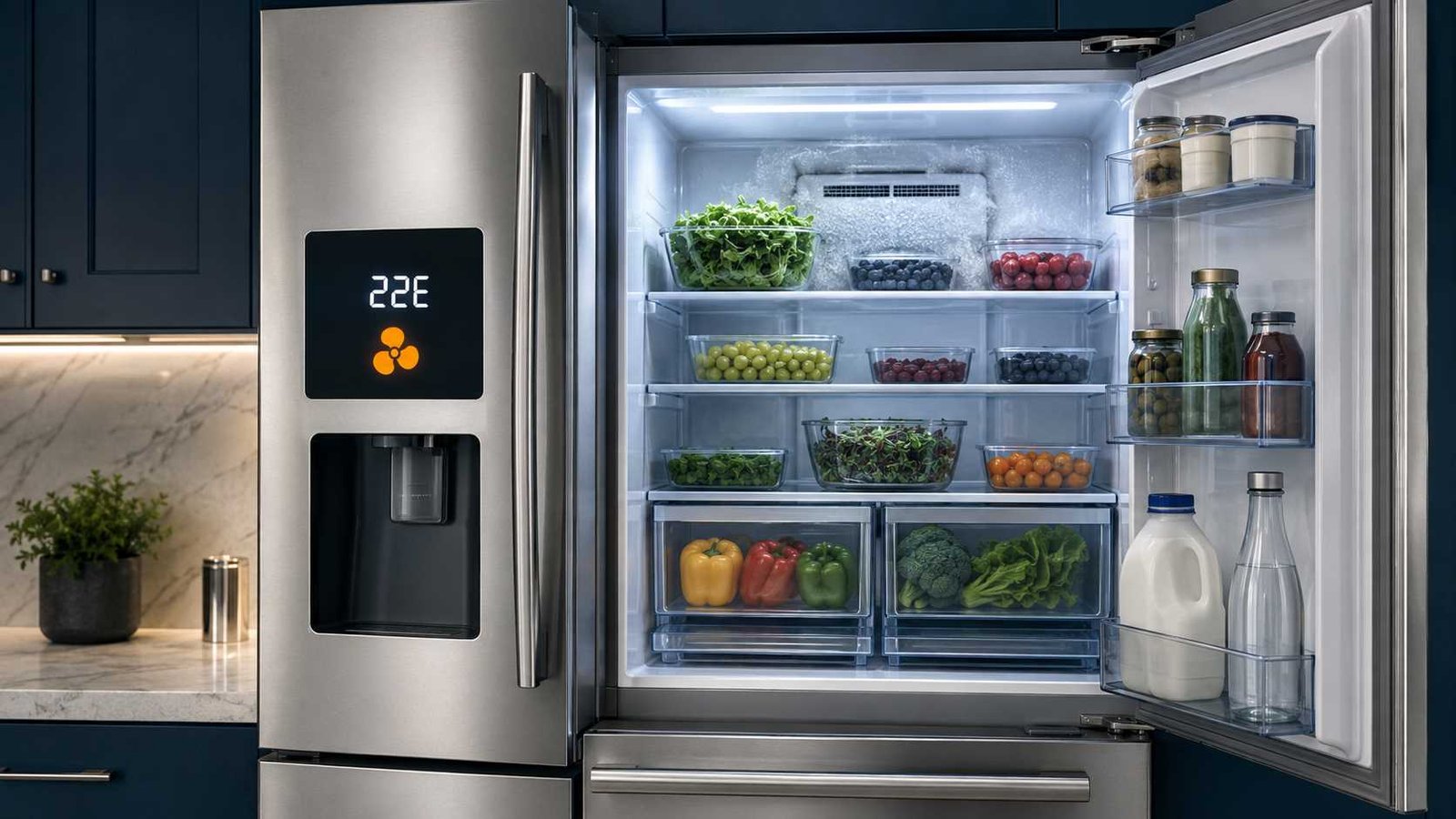
 The Samsung Refrigerator 22E Error Code usually indicates a problem with the fan that circulates cold air through the refrigerator or fresh-food compartment. Samsung also displays this fault as 22C on some refrigerators.
A door left open for too long can allow warm, moist air inside, leading to frost around the fan. The fan may then become restricted or stop turning. A failed fan motor or fan-feedback problem is also possible.
Start by checking that the doors close completely, the seals are clean, and food is not blocking the rear air vents. If cooling has become unreliable, protect perishable food before troubleshooting. Do not remove the internal rear panel, chip away ice, or use a hair dryer. Samsung recommends an unplugged, open-door defrost and professional service if the error returns.
Samsung 22E
| Item | Details |
|---|---|
| Error code | 22E or 22C |
| Official meaning | Refrigerator or fresh-food compartment fan error |
| Appliance | Samsung refrigerator or fridge freezer |
| Most likely immediate problem | Fan restricted by ice or unable to operate correctly |
| Possible trigger | Door left open, poor door sealing or blocked airflow |
| Safe first check | Close the doors fully and clear food away from internal vents |
| Safe homeowner action | Unplug the refrigerator and allow it to defrost naturally with the doors open |
| Can it still be used? | Only while the refrigerator maintains a safe food temperature |
| Repair difficulty | Basic checks are easy; internal diagnosis requires a technician |
| Call for service when | The code returns, cooling remains weak or fan noise continues |
Samsung classifies 22E and 22C as a fridge fan error. Its current US and Canadian guidance says to unplug the refrigerator, leave the doors open for several hours, restart it, and request service if the code reappears.
What Does Error Code 22E Mean on a Samsung Refrigerator?
Error code 22E means the refrigerator is not detecting normal operation of the fan serving the fridge compartment.
This fan moves cold air through the refrigerator. If it cannot turn properly, the refrigerator section may gradually become too warm even when the freezer still appears to be working.
Samsung’s model-linked technical information describes 22E or 22C as an evaporator-fan motor fault involving missing fan feedback to the main printed circuit board. That does not automatically prove the motor has failed. Ice can physically restrict the fan and produce the same fault indication. Internal fan-voltage and feedback testing should be left to a qualified technician.
Is 22E the fridge fan or freezer fan?
The 22E code concerns the refrigerator-compartment fan.
It should not be confused with these related Samsung codes:
| Error code | Samsung’s listed meaning |
|---|---|
| 21E or 21C | Freezer fan error |
| 22E or 22C | Fridge fan error |
| 23E or 23C | Condenser fan error |
Checking the exact code matters because different fans cool different parts of the appliance.
Are 22E and 22C the same error?
Yes. Samsung groups 22E and 22C together as the same refrigerator-fan error. The displayed format can vary with the model, regional product series and control-panel design.
Common Symptoms of a Samsung 22E Error
The error code may appear with one or more of these symptoms:
- The refrigerator compartment feels warmer than usual.
- Milk, drinks or other food no longer feel properly chilled.
- Little or no cold air comes from the refrigerator vents.
- The freezer remains cold while the refrigerator section warms.
- A buzzing, whining or grinding noise comes from behind the refrigerator’s internal rear wall.
- The noise stops when a refrigerator door is opened.
- Frost or condensation appears around the rear air vents.
- The compressor seems to run for long periods.
Samsung explains that a noise which stops when the door opens may come from a fan striking ice. On applicable refrigerators, the fan switches off when the door opens, which is why the sound temporarily disappears.
These symptoms support a fan or airflow problem, but they do not identify the exact failed part.
What Causes the Samsung Refrigerator 22E Error?
1. Refrigerator door left open
Samsung specifically identifies leaving the refrigerator door open for too long as a possible cause of 22E or 22C.
Warm, humid room air enters the compartment when the door remains open. That moisture can freeze around the evaporator and fan area, eventually preventing the fan from turning freely.
2. Door not sealing properly
A dirty, folded, loose or damaged door gasket may allow warm air to enter even when the door appears closed.
Check the entire gasket for:
- Food residue
- Sticky patches
- Folded sections
- Cracks or tears
- Areas that do not contact the cabinet
- Packaging trapped between the door and cabinet
Clean accessible seals with a soft cloth and mild soapy water. Do not pull the gasket away from the door or attempt structural door adjustments unless the model manual provides a safe procedure.
3. Food blocking the door
Large containers, drawers, bottles or food packages can prevent the door from closing completely.
Check that:
- Drawers are fully inserted.
- Shelves are seated correctly.
- Bottles are not striking the door bins.
- No bag or package extends beyond the shelf edge.
- The refrigerator is not packed so tightly that air cannot circulate.
4. Blocked refrigerator air vents
Cold air cannot circulate properly when food is pressed against the rear vents.
Samsung Australia advises keeping food at least 5 cm away from rear vents on applicable Australian models. Exact spacing can vary, but leaving a visible gap around the vents is a useful general practice.
5. Ice around the fan
Ice can prevent the fan blade from moving or cause it to strike the surrounding housing.
A buzzing, scraping or grinding noise that stops when the door opens is a strong clue. A natural manual defrost may temporarily free the fan, but Samsung warns that service may still be required to correct the original cause of recurring ice.
6. Failed refrigerator fan motor
The evaporator-fan motor may be worn, seized or electrically faulty.
The code itself cannot confirm motor failure. The fan and its electrical feedback circuit need proper testing before any part is replaced.
7. Wiring or control problem
A loose connector, damaged wire or main control-board fault may interrupt power or feedback between the refrigerator fan and the control system.
These are technician-level possibilities. Do not open interior panels or perform live-voltage tests.
8. Repeated frost buildup
When the fan becomes iced over again after a complete thaw, the refrigerator may have an underlying moisture, airflow, sealing or defrost-related problem.
The 22E code does not identify a particular defrost component. Further diagnosis is needed before replacing a heater, sensor, fan or control board.
Protect Refrigerated Food Before Troubleshooting
Do not judge food safety only by touching a container. Use a refrigerator thermometer where possible.
For the United States and Canada, refrigerated food should generally remain at 4°C or 40°F or below. Health Canada uses the same limit, while the USDA warns that perishable food held above 40°F for more than two hours may be unsafe.
The UK Food Standards Agency recommends keeping the refrigerator between 0°C and 5°C. Australian and New Zealand food-safety guidance generally uses 5°C or colder for potentially hazardous food.
Move milk, meat, seafood, cooked food, soft cheese and other vulnerable items to another working refrigerator or a properly iced cooler when:
- The measured temperature is above the recommended range.
- The compartment has been warm for an uncertain period.
- A long manual defrost is required.
- The error is accompanied by weak or missing cooling.
When the refrigerator is unplugged, avoid repeatedly opening the temporary food cooler.
Safe Checks Before Defrosting
Complete these checks without removing any internal covers.
1. Confirm the code
Write down or photograph the displayed code before disconnecting power. Samsung warns that clearing codes unnecessarily can make professional diagnosis more difficult. For 22E and 22C, however, Samsung specifically authorises an unplugged open-door defrost.
2. Close every door completely
Open and close the refrigerator and freezer doors. Check that they sit evenly and do not reopen by themselves.
3. Inspect the accessible seals
Look for dirt, damage or gaps around the entire door perimeter. Clean residue with a soft damp cloth and dry the surface.
4. Rearrange food
Remove anything preventing a drawer or door from closing. Leave space around the rear vents so cold air can circulate.
5. Listen for a fan-related noise
A whining, buzzing or grinding noise that disappears when the refrigerator door opens may indicate the fan is contacting ice or another obstruction. Do not attempt to reach the fan through the vent openings.
6. Look for visible frost
Check the accessible rear wall and vent area. Heavy frost supports the possibility of an airflow or icing problem, but the absence of visible frost does not rule out concealed ice.
How to Defrost a Samsung Refrigerator Safely
A short power reset and a manual defrost are different procedures. A quick reset can reboot the electronics, but it cannot melt substantial ice surrounding a concealed fan.
Samsung’s 22E instructions call for leaving the refrigerator unplugged with the doors open for several hours. Its detailed manual-defrost guidance says the process may continue until meltwater stops or up to 24 hours. The time needed depends on the amount and location of the ice.
Step 1: Protect the food
Remove perishable food and place it in another refrigerator or a cooler with enough ice or cold packs.
Empty any ice buckets because the ice will melt while the appliance is off.
Step 2: Disconnect the refrigerator
Unplug the refrigerator from the wall outlet. When the plug is inaccessible, switch off the correct dedicated circuit only when you can identify it safely.
Step 3: Open the doors
Leave the refrigerator and freezer doors open. This allows room-temperature air to melt concealed ice naturally.
Step 4: Protect the floor
Place absorbent towels around and beneath the front of the refrigerator. Replace wet towels as needed.
Do not allow water to collect around the plug, wall outlet, power cord or electrical components.
Step 5: Allow enough thawing time
Leave the appliance off for several hours. Where there are clear signs of substantial fan icing, a longer thaw may be necessary.
Samsung’s detailed guidance allows the manual defrost to continue until towels stop becoming wet or up to 24 hours.
Step 6: Do not accelerate the process
Never use:
- A hair dryer
- A heat gun
- A space heater
- Boiling water
- A knife
- A screwdriver
- An ice pick
- Any sharp or metal object
Samsung specifically warns against using a hair dryer or another heat source because it can damage the refrigerator. Sharp tools can puncture a concealed refrigerant line or damage the interior liner.
Step 7: Dry accessible water
Wipe away visible moisture using dry towels. Do not remove the evaporator cover or reach into electrical areas.
Step 8: Restart the refrigerator
Close the doors and reconnect power. Give the refrigerator time to begin cooling.
Samsung’s detailed manual-defrost instructions say food may be returned after about two hours, but only do so after confirming that the compartment is cooling normally. A full return to the selected temperature can take longer.
Reset Versus Manual Defrost
| Procedure | What it does | What it cannot do |
|---|---|---|
| Short power reset | Reboots the refrigerator electronics | Cannot melt significant fan ice |
| Open-door manual defrost | Allows concealed ice to melt naturally | Does not repair a failed fan or the cause of recurring ice |
| Professional diagnosis | Tests the fan, feedback circuit and related systems | Should not be replaced by repeated resets |
Do not keep resetting the refrigerator whenever 22E appears. Repeated resets may temporarily clear the display without restoring reliable cooling.
What to Check After Restarting
Monitor the refrigerator over the next several hours.
Check whether:
- The 22E or 22C code returns.
- Cold air begins coming from the refrigerator vents.
- The unusual buzzing or grinding noise has stopped.
- The refrigerator temperature moves back into the safe range.
- The doors continue to close and seal properly.
- Frost starts reappearing around the rear vent area.
Do not rely only on the displayed set temperature. That number shows the selected setting and may not represent the current temperature of the food compartment.
What If 22E Returns After Defrosting?
Samsung recommends requesting service when the code comes back after the open-door defrost.
A returning error may mean:
- Ice did not fully melt.
- The refrigerator door is still not sealing correctly.
- The fan motor cannot start or maintain the correct speed.
- The fan blade or housing is damaged.
- The fan-feedback signal is missing.
- An internal wiring or connector problem exists.
- Repeated frost has an unresolved underlying cause.
- The main control board is not operating the fan correctly.
Do not order a fan motor solely because 22E appears. The code identifies the affected system, not necessarily the exact component that must be replaced.
Parts a Technician May Inspect
| Component or area | Why it may be checked |
|---|---|
| Refrigerator evaporator-fan motor | May be seized, worn or electrically faulty |
| Fan blade and housing | May be damaged, obstructed or contacting ice |
| Fan wiring and connectors | May interrupt power or fan feedback |
| Door gasket and alignment | May allow humid air into the compartment |
| Air ducts and vents | May be restricted by frost or another obstruction |
| Defrost-related system | May require evaluation when ice repeatedly returns |
| Main control board | May not power the fan or process its feedback correctly |
Fan removal, voltage measurement, internal wiring tests and control-board diagnosis should be completed by a qualified refrigerator technician.
Model and Regional Differences
Samsung refrigerators use different control panels, software systems and code-display formats.
Some models use a segmented digital display. Family Hub models may store current or past errors in the Fridge Manager self-check function. Samsung also warns that model sequences, error codes and settings can differ by country and place of purchase.
For that reason:
- Do not assume that a button combination found online applies to your refrigerator.
- Do not enter forced-defrost or diagnostic mode without the exact model instructions.
- Locate the complete model code, not just the refrigerator’s product-family name.
- Use the Samsung support site for the country where the appliance was purchased.
- Follow the user manual for that exact regional model.
The model label is commonly found inside the refrigerator compartment, near a side wall, behind a drawer or around the door frame. Its position varies.
When to Stop and Request Service
Contact Samsung support or a qualified refrigerator technician when:
- The 22E or 22C code returns after a complete natural defrost.
- The refrigerator compartment does not return to a safe temperature.
- There is no airflow from the refrigerator vents.
- Grinding or scraping continues.
- Frost quickly returns.
- The door does not seal despite cleaning and rearranging food.
- Water appears near electrical parts or the power connection.
- The refrigerator trips the circuit breaker.
- You notice a burning smell, smoke or visible electrical damage.
- Diagnosis would require removing the internal rear panel.
- A fan, sensor, wire or control board needs electrical testing.
Unplug the refrigerator and stop using it immediately if there is smoke, a burning smell, sparking, exposed wiring or repeated breaker tripping.
Safety Warnings
Do not chip or scrape ice from the refrigerator. Sharp tools can damage the liner, fan housing or concealed refrigeration tubing.
Do not use a hair dryer, heat gun or space heater. Samsung warns that external heat can damage the appliance.
Do not test live voltage. The refrigerator contains mains-powered circuits and moving components.
Do not bypass a door switch or safety device.
Do not open the sealed refrigeration system. Refrigerant work requires appropriate tools, training and local legal compliance.
Frequently Asked Questions
Can leaving the Samsung refrigerator door open cause 22E?
Yes. Samsung lists leaving the refrigerator door open for too long as a possible cause. Warm, moist air can enter and contribute to frost around the refrigerator fan.
Will unplugging the refrigerator clear error code 22E?
It may clear the code if temporary ice or a control interruption caused it. Samsung recommends unplugging the appliance and leaving the doors open for several hours. A quick unplug-and-reconnect may reset the display but will not melt substantial ice.
How long should I defrost a Samsung refrigerator with 22E?
Samsung’s code guidance says several hours. Its detailed manual-defrost instructions allow the refrigerator to remain unplugged with the doors open until meltwater stops or up to 24 hours. More ice requires more time.
Can the freezer still work when the refrigerator shows 22E?
It may. The 22E code concerns the refrigerator-compartment fan, so the freezer can sometimes remain cold while the fresh-food section warms. Check both compartments with suitable thermometers rather than assuming either section is safe.
Does 22E mean the fan motor must be replaced?
No. A failed fan motor is possible, but ice, a door-sealing problem, restricted airflow, wiring or missing fan feedback can also trigger the error. Diagnosis is needed before replacing parts.
Why does the fan noise stop when I open the door?
On applicable Samsung refrigerators, the compartment fan turns off when the door opens. If the fan is striking ice, opening the door stops the fan and the noise disappears.
Can I use a hair dryer to melt the ice faster?
No. Samsung specifically warns against using a hair dryer or another heat source during manual defrosting because it can damage the refrigerator.
What should I do when 22E returns after defrosting?
Check that the doors seal and the vents remain clear, then request service. Samsung recommends professional support when the code returns after the prescribed defrost procedure.
Daniel Brooks is a US-based appliance troubleshooting researcher with 12 years of experience studying washer, dryer, refrigerator, and dishwasher faults. He reviews manufacturer manuals and converts technical error codes into safe, practical guidance for homeowners.