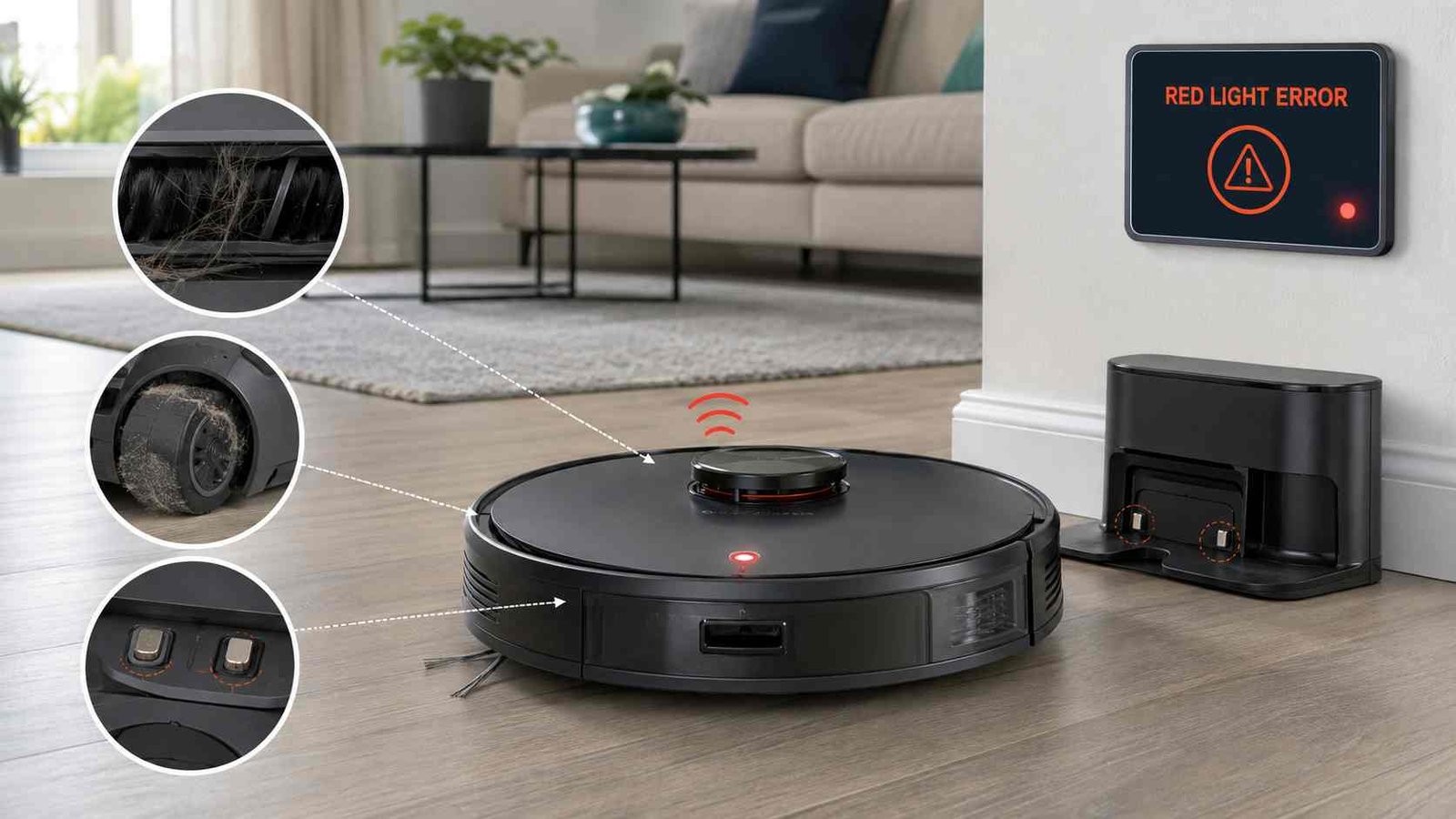
 A red light on a Eufy robot vacuum usually means the machine has detected a fault, but the exact meaning depends on the model, light pattern, beep count, voice message, and whether the light appears on the robot or its station.
On older Eufy RoboVac models, flashing or solid red lights work with a series of beeps to identify problems such as a stuck wheel, blocked brush, dirty drop sensor, low battery, or obstructed suction fan. Newer models may display a flashing red light and provide the actual error through a voice alert or the Eufy Clean app.
Before cleaning any moving part, switch off the robot. Do not continue using it if it has collected liquid, shows signs of battery damage, or repeatedly reports an unresolved motor or charging fault.
Eufy Red Light
| Item | Details |
|---|---|
| Brand | Eufy |
| Appliance | Robot vacuum or cleaning station |
| Warning | Solid, flashing, rapid, or breathing red light |
| Usual meaning | Obstruction, sensor fault, low battery, charging issue, or station problem |
| First safe check | Note the light pattern, beep count, voice alert, and app message |
| Repair difficulty | Usually easy if caused by debris; professional help may be needed for recurring internal faults |
| Can it still be used? | Usually not until the error is identified; breathing red can be normal on selected models |
| Professional help | Needed for repeated battery, charging, motor, sensor, wiring, or station errors |
What Does a Red Light Mean on a Eufy Robot Vacuum?
There is no single meaning for every Eufy red light.
Eufy uses different indicator systems across its product families:
- Older Bounce-series RoboVacs use flashing or solid red lights with beep counts.
- G-series and X8 models usually combine a flashing red light with a voice alert.
- LR20, LR30, and L35 models can show solid red simply because the battery is low and the robot is returning to charge.
- L50 and L60 models can display a breathing red light during normal low-battery charging.
- Newer models such as the X10 Pro Omni flash red rapidly and direct the owner to the Eufy Clean app.
- Omni and Auto-Clean stations may show red for water-tank, cleaning-tray, dust-bag, or station faults.
Here’s what matters: identify the location, pattern, and sound before attempting a fix.
Eufy Red-Light Pattern Guide
| Light behaviour | Common meaning |
|---|---|
| Flashing red with beeps | Error on older Bounce-series models |
| Solid red with beeps | Component obstruction on older Bounce-series models |
| Flashing red with voice alert | Error on G-series, X8, LR20, LR30, or L35 models |
| Solid red without beeps | May indicate low power on LR20, LR30, and L35 |
| Breathing red while docked | Normal charging below 12% on L50 and L60 |
| Rapidly flashing red | Error on models such as X10 Pro Omni; check the app |
| Red light on station | Water, tray, dust-bag, or station error on selected Omni models |
Model instructions should take priority because the same colour can mean different things on different Eufy products.
Eufy Flashing Red Light and Beep Codes
The following beep system applies to older Eufy RoboVac models that use Bounce-series error tones, including the RoboVac 30C and related models.
Flashing Red With One Beep
A flashing red light with one beep usually means the robot is stuck or one drive wheel is no longer touching the floor.
This may happen when the vacuum:
- Climbs onto a high threshold
- Becomes trapped on furniture
- Hangs partly over a step
- Gets caught on a thick rug
- Operates in an unusually large open area without registering obstacles
Move the vacuum to a flat, open section of hard flooring. Check both wheels for tangled hair and confirm that they move and spring back freely.
Flashing Red With Two Beeps
Two beeps with a flashing red light indicate that the front bumper is stuck.
Press the bumper gently several times. It should move inward and return without binding. Remove visible dirt from the bumper edge and wipe the surface with a dry cloth.
Do not force a bumper that remains jammed. A damaged spring, sensor, or bumper assembly may require service.
Flashing Red With Three Beeps
Three beeps with a flashing red light usually indicate dirty drop sensors or a robot that is trapped near a stair edge and cannot reverse.
Switch off the vacuum and clean the underside drop sensors with a soft, dry cloth. Move the robot away from stairs and test it on a plain, light-coloured hard floor.
Dark, reflective, or heavily patterned flooring can sometimes affect anti-drop sensor performance. Eufy recommends using a physical barrier or app-based restricted zone where there is a risk of falling.
Flashing Red With Four Beeps
Four beeps with a flashing red light usually mean the battery level is too low.
Check that the charging base is powered and that its indicator is illuminated. Clean the robot and base charging contacts with a dry cloth, place the robot near the station, and use the return-to-base function so it docks itself correctly.
Older Bounce-series models may require approximately five to six hours to charge fully.
Eufy Solid Red Light and Beep Codes
On older models, a solid red light generally points to a specific moving component or suction obstruction.
Solid Red With One Beep
One beep with a solid red light indicates that the left or right drive wheel is stuck.
Switch off the robot. Check the wheel identified by the vacuum, if the model provides a side indication. Remove accessible hair, thread, carpet fibres, or debris around the wheel.
Press each wheel gently. Both should move and spring back in a similar way. A wheel that remains stiff after cleaning may have a damaged wheel module or motor.
Solid Red With Two Beeps
Two beeps with a solid red light mean the side brush is stuck.
Turn off the robot and inspect the side brush. Hair commonly wraps around the brush shaft beneath the visible bristles.
Remove the brush only if your model’s normal maintenance instructions allow it. Clear tangled material, reinstall the brush securely, and confirm that it turns freely.
If the error returns immediately with a clean brush, the side-brush motor or drive may require further diagnosis.
Solid Red With Three Beeps
Three beeps with a solid red light indicate that the suction fan is obstructed or unable to operate correctly.
Remove and empty the dust collector. Check the suction inlet for clumps of hair, paper, fabric, or compacted dust. Inspect the filter and make sure it is correctly installed and completely dry.
Do not run the vacuum with wet filters. Do not open the fan housing or attempt to test its internal wiring. Eufy advises that servicing beyond normal cleaning should be handled by an authorised service representative.
Solid Red With Four Beeps
Four beeps with a solid red light mean the rolling brush is stuck.
Switch off the robot and remove the rolling-brush guard. Lift out the brush and clear hair from:
- The brush bristles
- Both brush ends
- The bearing or end cap
- The brush chamber
- The drive connection
Reinstall the brush and guard securely. If the brush is clean but cannot rotate, the brush drive or motor may need repair.
Eufy Red Light While Charging
A red light that appears while the vacuum is docked should first be treated as a charging or battery issue, unless your model normally uses breathing red during low-battery charging.
Check the Charging Base
Confirm that:
- The base power adapter is connected securely.
- The wall outlet works.
- The base power indicator is illuminated.
- The station is placed on a hard, level floor.
- Nothing prevents the robot from sitting fully against the contacts.
Eufy recommends allowing the RoboVac to dock itself where possible so the charging pins align correctly.
Clean the Charging Contacts
Switch off and unplug the equipment before cleaning.
Use a soft, dry cloth to wipe:
- The metal contacts beneath the vacuum
- The contacts or pins on the charging base
- Dust around the docking area
Do not use dripping-wet cloths, metal tools, or abrasive cleaners.
Allow Enough Charging Time
For older Bounce-series models, Eufy commonly recommends charging for at least six hours when investigating a red charging light. Normal charging may show breathing orange, changing to solid blue when fully charged.
Four or Five Beeps While Charging
If an older RoboVac repeatedly gives four or five beeps with a solid red light while docked, Eufy says the issue is usually related to the battery.
First confirm base power, contact alignment, and a full charging period. If the error continues, the battery may need replacement or the charging system may require service.
When Breathing Red Is Normal
On Eufy L50 and L60 iPath-navigation models, breathing red means the robot is charging while the battery level is at or below 12%.
Once the charge rises above 12%, the light changes to breathing white. A breathing red light on these models is therefore not automatically an error.
Red-Light Meanings on Newer Eufy Models
G-Series and X8
On G-series and X8 RoboVacs, a flashing red light with a voice alert means an error has occurred.
The spoken message or error number is more useful than the colour itself. Record the exact wording and use the matching model support instructions.
LR20, LR30, and L35
On these models:
- Solid red means low power while returning to the charging base.
- Flashing red with a voice alert means an actual error.
A solid red light during a return-to-charge cycle may therefore be normal.
Eufy E20
The Eufy Robot Vacuum 3-in-1 E20 uses its last battery indicator light for red warnings.
A solid red final indicator means the robot has triggered an error. The app or product alert should be checked for the specific cause.
X10 Pro Omni
On the X10 Pro Omni, a rapidly flashing red light means an error. Eufy directs owners to the Eufy Clean app for the specific instruction.
Normal charging on this model is shown by a pulsing white light, not red.
Eufy Station Red Light
Make sure the red light is not coming from the cleaning or auto-empty station rather than the robot.
X9 Pro Auto-Clean Station
A red light on the X9 Pro station means the station has detected a problem. Official troubleshooting begins with the water system and cleaning tray.
Check that:
- Both water tanks are installed correctly.
- The clean-water tank contains water.
- The dirty-water tank is not full.
- The dirty-water tank lid is sealed.
- The cleaning tray is installed correctly.
- The tray and drainage area are not blocked.
Omni C20 Base Station
A steady red light on the Omni C20 means the base station has an error.
Eufy recommends checking the app notification, clean- and dirty-water tanks, tank lids, water levels, clean-tank float, cleaning tray, and dust bag. The dust bag should seat correctly and normally produce a click when installed.
If the red light remains after all removable items are properly installed, further station diagnosis may be required.
Safe Step-by-Step Troubleshooting
1. Identify the Exact Model
Look for the model name or product number on the underside label, dustbin area, app device page, original box, or manual.
Do not assume instructions for an 11S, L60, X8, X10, E20, or Omni C20 are interchangeable.
2. Record the Warning
Before restarting, note:
- Solid, flashing, rapid, or breathing red
- Number of beeps
- Exact voice message
- App error text
- Whether the light is on the robot or station
- Whether it happens while cleaning, docking, or charging
This information helps prevent unnecessary cleaning of unrelated components.
3. Switch Off Before Cleaning
Power off the robot before handling the wheels, brushes, intake, sensors, or charging contacts. Unplug the station before cleaning its contacts or tray area.
Eufy’s maintenance guidance says to power off the device and unplug the adapter before cleaning, with other servicing left to an authorised representative.
4. Check the Component Named by the Alert
Inspect the indicated part first rather than dismantling the entire vacuum.
Common checks include:
- Drive wheels for hair or thread
- Front bumper for trapped debris
- Drop sensors for dust
- Side brush for wrapped hair
- Rolling brush and end caps
- Suction inlet and dustbin
- Charging contacts
- Water tanks, cleaning tray, and dust bag
5. Reinstall Everything Correctly
A part may look clean but still trigger an error if it is not seated properly.
Reinstall the:
- Dust collector
- Filter
- Rolling brush
- Brush guard
- Side brush
- Water tanks
- Cleaning tray
- Dust bag
6. Test on a Clear Hard Floor
Place the vacuum on a dry, level, uncluttered hard floor away from stairs.
Remove cords, tassels, small objects, and lightweight fabric that may catch in the wheels or brushes.
7. Restart the Robot
For older models with a bottom power switch, turn the switch off, wait briefly, and turn it back on. The RoboVac 30C guidance specifically recommends switching off, waiting two seconds, and switching on again when the machine stops unexpectedly.
Newer models may use a power button or app control. Follow the manual for the exact model.
8. Read the App Again
If the red light returns, check whether the app now provides a more precise component, error number, or service instruction.
Wi-Fi Reset Is Not the Same as Clearing a Hardware Error
Resetting the Wi-Fi connection does not normally fix a stuck wheel, blocked brush, fan obstruction, battery problem, or station fault.
Eufy uses different Wi-Fi reset button combinations across its product families. Some models reset only the network connection, while selected models may restore additional settings. Do not use a button sequence taken from another model.
A basic power restart is the safer first step after the indicated component has been cleaned.
What If the Red Light Returns After Cleaning?
A recurring warning does not always mean the component is still dirty.
Possible causes include:
| Repeated symptom | Possible cause |
|---|---|
| Wheel error after debris removal | Stiff wheel bearing, damaged wheel module, or drive motor fault |
| Bumper error after cleaning | Bumper not returning correctly or internal bumper sensor issue |
| Drop-sensor error on one floor only | Dark, reflective, or patterned flooring |
| Side-brush error with a free brush | Side-brush drive or motor problem |
| Rolling-brush error with a clean brush | Worn end cap, damaged drive coupling, or brush motor fault |
| Suction-fan error with clear inlet | Internal fan or airflow-detection problem |
| Red light while charging | Poor contact, weak battery, base fault, or internal charging issue |
| Station stays red | Tank, float, tray, dust-bag detection, pump, or station fault |
These are possible causes, not confirmed diagnoses. Internal electrical testing, motor replacement, wiring work, and battery-pack disassembly are not suitable homeowner checks.
Can You Continue Using the Robot?
It depends on the light pattern.
You may usually leave the robot charging when an L50 or L60 displays its normal breathing red low-charge indication.
Do not continue a cleaning cycle when the robot reports:
- A stuck brush or wheel
- A suction-fan error
- A drop-sensor warning near stairs
- A battery or charging fault
- A station water-system error
- A repeated error that returns immediately after restarting
Do not use a robot vacuum to collect puddles or large amounts of liquid. Eufy warns that this may damage the device.
When to Contact Eufy Support or a Repair Service
Contact support when:
- The same red-light error returns after the indicated part is cleaned.
- The wheel, brush, bumper, or fan cannot move normally.
- The robot will not charge after the base and contacts have been checked.
- A battery warning continues after a full charging attempt.
- The robot becomes unusually hot or shows physical battery damage.
- A station remains red after its tanks, tray, and dust bag are correctly installed.
- The app specifically requests service.
- Liquid has entered the vacuum body.
- The machine requires internal disassembly or electrical testing.
Prepare the model number, serial number, purchase information, light pattern, beep count, voice message, app screenshot, and a short video of the fault where possible.
Warranty and repair availability can vary by country, sales channel, and model. Eufy’s X10 Pro Omni manual, for example, states that warranty terms may depend on local legal requirements and the seller.
Frequently Asked Questions
Why is my Eufy robot vacuum flashing red?
A flashing red light normally means an error, but the exact cause depends on the model. Older RoboVacs use beep counts, while newer models use voice alerts or app messages. On some older models, flashing red with four beeps means low battery.
What does a solid red light mean on a Eufy RoboVac?
On older Bounce-series models, solid red with beeps identifies an obstructed wheel, side brush, suction fan, or rolling brush. On LR20, LR30, and L35 models, solid red can simply indicate low power while returning to charge.
Why is my Eufy red while charging?
The contacts may be misaligned or dirty, the charging base may not have power, or the battery may not be accepting charge. However, breathing red is normal on L50 and L60 models when charging at 12% battery or below.
What do four beeps and a red light mean?
Flashing red with four beeps usually means low battery on older models. Solid red with four beeps usually means the rolling brush is stuck. Four or five beeps with solid red while docked can indicate a battery-related problem.
How do I clear the Eufy red-light error?
Identify the pattern and beep or voice message, switch off the robot, clean the indicated component, reinstall all removable parts, restart the vacuum, and test it on a clear hard floor. Use the Eufy Clean app when available.
Why is the red light still on after cleaning the brush?
The brush may be installed incorrectly, hair may remain around an end cap, or the brush drive may be unable to turn. If the error returns immediately with a clean, freely moving brush, further diagnosis may be needed.
Should I factory reset my Eufy RoboVac?
Not as the first step. A reset will not remove hair from a wheel, clear a blocked fan, repair a battery, or reseat a station tank. Reset instructions also differ by model. Start with the exact warning and model-specific maintenance steps.
Is the red light on my Eufy station the same as the robot error?
No. A red station light commonly relates to the water tanks, cleaning tray, dust bag, drainage system, or another base-station fault. Check the light’s location before troubleshooting.

Emily Carter is an Australian home-appliance safety editor with 9 years of experience researching washers, air conditioners, refrigerators, and coffee machines. She checks troubleshooting steps for accuracy, regional model differences, and homeowner safety before publication.