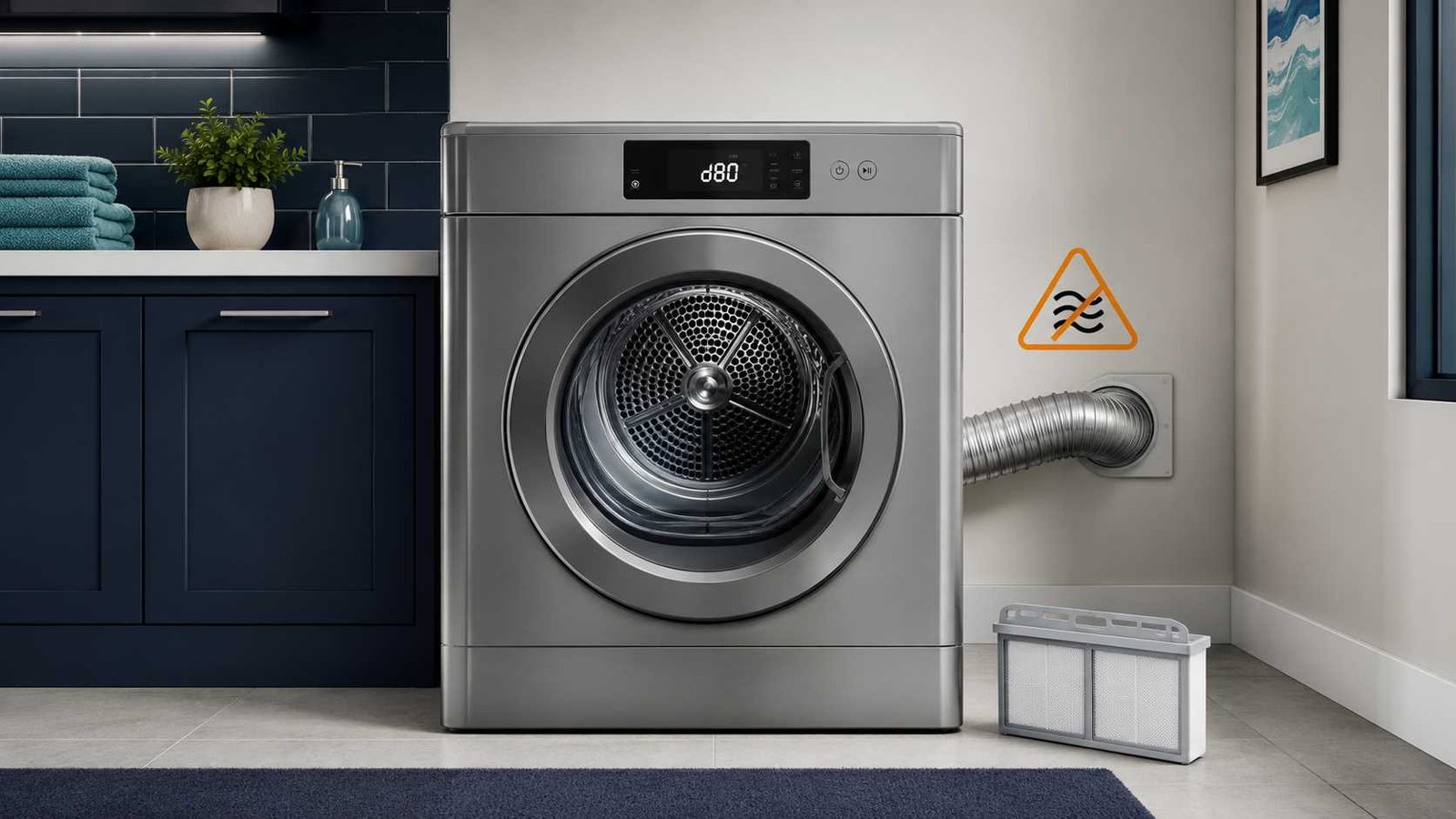
 The LG Dryer d80 error code usually means the dryer has detected an airflow restriction of approximately 80% in the exhaust system. The blockage may be in the lint filter, the hose behind the dryer, concealed household ductwork, or the outside vent outlet.
Start by stopping the dryer, letting it cool, and cleaning the lint filter. Then inspect the visible exhaust hose for crushing or sharp bends. Do not keep running heated cycles when airflow is weak, the dryer becomes unusually hot, or you notice a burning smell.
LG describes d80 as an exhaust restriction warning rather than proof that a particular dryer component has failed. Cleaning or correcting the airflow path should therefore come before replacing parts.
LG Dryer d80
| Item | Answer |
|---|---|
| Brand | LG |
| Appliance | Externally vented clothes dryer |
| Code | d80 or D80 |
| Meaning | The exhaust system is approximately 80% restricted |
| Most common cause | Lint or a restricted exhaust duct |
| First safe check | Clean the lint filter and inspect the hose behind the dryer |
| Can you reset it? | Yes, but resetting does not remove a blockage |
| Can you continue using it? | Avoid heated use until proper airflow is confirmed |
| Likely professional | Dryer-vent cleaning specialist |
| When appliance service is needed | The code returns after the complete exhaust path has been verified |
LG groups d80 with d75, d90, d95 and the Flow Sense indicator. The number represents the approximate degree of exhaust restriction detected by the dryer.
What Does d80 Mean on an LG Dryer?
An LG dryer needs to move hot, moisture-filled air out of the drum and through the home’s exhaust system. When that air cannot escape properly, drying takes longer and heat can build up inside the appliance and ductwork.
The d80 warning means the airflow path is severely restricted. The problem may be close to the dryer or several metres or feet away inside a wall, ceiling, attic, crawlspace, or roof vent.
The warning does not automatically mean that the heating element, motor, control board, or sensor needs replacement. LG’s first recommended actions focus on the lint filter and exhaust system.
Difference Between d75, d80, d90 and d95
| Display | Approximate restriction |
|---|---|
| d75 | 75% |
| d80 | 80% |
| d90 | 90% |
| d95 | 95% |
A higher number indicates a more serious airflow restriction. However, any repeated Flow Sense warning deserves attention. Do not wait for d80 to become d90 or d95 before checking the vent.
Is It Safe to Use an LG Dryer With a d80 Code?
It is better to stop heated drying until you have checked the airflow path.
A restricted dryer vent can cause:
- Longer drying times
- Damp clothes at the end of a cycle
- Excessive heat around the dryer
- Repeated Flow Sense warnings
- Premature cycle interruption
- Lint accumulation inside the ventilation system
Failure to clean was the leading contributing factor in 31% of reported US home clothes-dryer fires from 2018 through 2020, according to the U.S. Fire Administration. The agency recommends cleaning the lint filter each time the dryer is used and cleaning dryer vent ductwork annually.
Stop using the dryer immediately if you notice smoke, scorching, a burning smell, a gas smell, a damaged power cord, visible sparks, or an abnormally hot cabinet. Disconnect power when it is safe to do so and contact an appropriate professional.
Common Causes of the LG Dryer d80 Code
1. A dirty lint filter
A thick layer of lint restricts air before it reaches the exhaust duct. Even when the filter looks reasonably clean, residue from dryer sheets or fabric products can reduce airflow through the screen.
LG recommends removing lint between loads. It also advises washing the filter with warm water and a soft brush when necessary, then allowing it to dry completely before reinstalling it.
2. A crushed exhaust hose
The transition hose between the dryer and the wall can become flattened when the appliance is pushed back.
Check for:
- Crushed sections
- Sharp bends
- Deep dents
- A hose compressed against the wall
- Multiple coils stacked like a spring
- Loose connections
- Holes or separated joints
LG advises keeping this section straight or in a gentle S-shaped route rather than tightly coiled.
3. Lint inside the household duct
Cleaning the short hose behind the dryer does not clean the duct inside the building. Lint may collect farther along the route, particularly where the duct has several bends or travels a long distance.
This is a common reason the d80 code returns even though the visible hose and filter look clean.
4. A blocked outside vent outlet
The exterior hood or flap may be jammed by:
- Lint
- Dust
- Leaves
- Animal nesting material
- Snow or ice
- A damaged cover
- Paint or corrosion
During an Air Dry cycle, the outside flap should open fully and a noticeable stream of air should leave the vent. LG recommends removing visible lint and replacing an outlet cover that cannot open correctly.
5. Excessive duct length or too many elbows
Long duct routes and multiple 90-degree turns increase airflow resistance and provide more places for lint to collect.
The permitted duct length depends on the model, duct diameter, duct material, number of bends, and outlet design. Use the installation manual for the dryer’s complete model number rather than relying on one general distance limit.
6. An overloaded drum
An extremely full drum can reduce the movement of air through the clothing. LG includes reducing the load size among its homeowner checks for Flow Sense warnings.
7. An installation problem
A d80 code on a recently installed dryer may point to:
- A vent hose crushed during installation
- An existing household duct that was not cleaned
- An incorrectly routed duct
- A closed outside vent
- Excessive bends
- The wrong ventilation arrangement
Contact the installer when the problem began immediately after installation.
8. A gas-supply issue on selected gas dryers
LG’s US error-code guidance notes that on gas dryers, a d80 display may indicate that gas is not being supplied to the appliance. This may not apply to every model, so check the model-specific manual and display information.
A homeowner may confirm that an accessible gas shutoff valve is fully open, provided there is no gas smell and no need to move or disconnect the gas line.
Do not loosen fittings, repair gas lines, bypass safety devices, or attempt combustion adjustments. Contact the installer, gas utility, or a qualified gas-appliance professional when gas supply is uncertain.
How to Troubleshoot the LG Dryer d80 Code
Step 1: Stop the dryer and let it cool
End the cycle and allow the dryer to cool before touching the exhaust hose or moving the appliance.
If the cabinet is unusually hot, there is no outside airflow, or you smell something burning, leave the dryer off.
Step 2: Clean the lint filter
- Remove the lint filter.
- Clear all visible lint.
- Check for tears, warping, or damage.
- If the mesh appears coated, wash it with warm water and a soft brush.
- Let it dry completely.
- Reinstall it correctly.
Do not operate the dryer without its lint filter.
Step 3: Reduce the load
Remove some clothing if the drum is tightly packed. Air needs room to pass through the load and carry moisture toward the exhaust.
Run a smaller load only after completing the visible vent checks.
Step 4: Disconnect power before moving the dryer
Switch the dryer off and unplug it before pulling it away from the wall. When the plug is inaccessible, switch off the correct circuit breaker.
Do not pull the appliance by its cord, climb behind an unstable stacked installation, or attempt to move a heavy dryer alone.
Gas-dryer owners must avoid straining, twisting, or disconnecting the gas connection.
Step 5: Inspect the hose behind the dryer
Look for crushed, kinked, torn, or tightly coiled ducting. Correct only simple positioning problems that can be handled without disconnecting electrical or gas components.
The hose should not be crushed again when the dryer is returned to position.
Step 6: Check the outside outlet
Run an unheated Air Dry cycle and locate the outside exhaust.
Check whether:
- The flap opens fully
- Air is flowing steadily
- Visible lint surrounds the opening
- The cover is damaged
- A grille or screen is blocked
Keep hands away from moving flap components and do not reach deeply into inaccessible ductwork.
Step 7: Arrange concealed-duct cleaning
When the filter, rear hose, and outside outlet appear clear but d80 continues, contact a professional dryer-vent cleaner.
Ask the cleaner to check:
- Lint accumulation through the complete route
- Total duct length
- The number of 90-degree turns
- Crushed or separated sections
- Poorly designed routing
- The outside exhaust cover
LG recommends professional inspection of the home ventilation system when the visible checks do not resolve the warning.
Step 8: Test the dryer again
After correcting the airflow problem:
- Reconnect power.
- Confirm the hose is not compressed.
- Place a small or medium load in the drum.
- Select an appropriate cycle.
- Check airflow at the outside outlet.
- Watch for another d80 or Flow Sense warning.
How to Reset the LG Dryer d80 Code
A control-panel reset may remove a stored display message, but it cannot clear lint or repair a restricted duct.
LG provides the following general control-panel reset:
- Switch off the dryer.
- Unplug it or switch off its circuit breaker.
- While power is disconnected, press and hold Start/Pause for five seconds.
- Restore power.
- Switch on the dryer and run a test cycle.
The warning will return if the dryer continues detecting restricted airflow.
Do not repeatedly reset d80 while continuing normal heated cycles. Treat a returning code as evidence that more inspection is needed.
How to Run the LG Dryer Installation Test
Selected LG dryers include an installation or duct-condition test. It may display InS and then report a Flow Sense condition or related code.
The activation buttons vary by model and control-panel design. LG lists different button combinations for different model families, so there is no safe universal sequence.
To find the correct procedure:
- Locate the complete model number on the dryer’s identification label.
- Open the official owner’s manual or LG support page for that model.
- Search the manual for “installation test,” “duct condition,” or “Flow Sense.”
- Follow the preparation and button sequence exactly.
- Run the test with the dryer empty unless the manual says otherwise.
Using instructions from another model may start a different option or fail to enter the test.
What if d80 Returns After the Vent Was Cleaned?
A returning d80 code does not always mean the dryer needs a new component. Work through these checks first.
Confirm the entire duct was cleaned
Ask whether the cleaner serviced only the hose behind the dryer or the full path to the outside outlet.
Check the dryer’s position
The hose may have been clear while the appliance was pulled forward, then crushed again when it was pushed back.
Watch the outside flap
The duct may be open but the exterior cover may still restrict airflow.
Review the duct design
A clean but very long route with several elbows may still create excessive resistance. The installation may need modification.
Consider an internal airflow problem
After the complete household exhaust system has been professionally verified, LG advises arranging appliance service if the warning continues. A technician can inspect the dryer’s internal airflow and heating systems using the correct service information.
Do not order a thermostat, sensor, blower component, or control board based only on the d80 display. Official LG guidance does not identify one universal replacement part for this warning.
Which Professional Should You Call?
| Situation | Appropriate help |
|---|---|
| Lint suspected inside walls, attic, ceiling, or roof duct | Dryer-vent cleaning specialist |
| Long duct route or too many elbows | Ventilation contractor or qualified installer |
| Code began immediately after installation | Original installer |
| Damaged outside vent cover | Ventilation contractor |
| Gas supply is unavailable or uncertain | Qualified gas professional |
| Gas smell | Leave the area and contact the gas emergency service |
| d80 returns after full duct inspection | LG-authorised or qualified appliance technician |
| Damaged outlet, plug, cord, or breaker problem | Licensed electrician |
Models and Regional Differences
The d80 airflow guide mainly applies to externally vented LG dryers equipped with Flow Sense. It is particularly relevant to LG electric and gas dryers sold in the United States and Canada.
Current LG tumble-dryer ranges in the United Kingdom and Australia focus heavily on heat-pump models that recycle air and collect or drain condensed water rather than exhausting humid air through a conventional external dryer vent. Readers in the UK, Ireland, Australia, or New Zealand should confirm that their model is externally vented before following an exhaust-duct guide.
The full model number matters because:
- Control panels differ
- Installation-test buttons differ
- Electric and gas versions differ
- Duct requirements differ
- Error-code use may vary by region
- Ventless dryers use a different airflow and moisture-management system
How to Prevent the d80 Code
- Clean the lint filter after every load.
- Wash residue from the filter when airflow through the mesh becomes poor.
- Do not overload the drum.
- Keep the rear hose free from crushing and sharp bends.
- Check that the outside flap opens freely.
- Remove visible lint from the exterior outlet.
- Arrange annual dryer-vent cleaning.
- Check the duct after renovation, moving the dryer, or replacing the exhaust hose.
- Investigate drying times that suddenly become longer.
The U.S. Fire Administration recommends cleaning the lint filter every time the dryer is used and cleaning dryer vent ductwork annually.
Frequently Asked Questions
What does d80 mean on an LG dryer?
It usually means the dryer has detected an exhaust restriction of approximately 80%. The restriction may be in the lint filter, rear hose, concealed duct, or outside vent.
Can I keep using my LG dryer with a d80 code?
Avoid continued heated use until airflow has been checked. Stop immediately if the dryer becomes excessively hot or produces a burning smell, smoke, or weak outside airflow.
How do I clear the d80 code?
Correct the airflow restriction first. You can then switch off and disconnect power, hold Start/Pause for five seconds while the dryer is without power, and restore power. Resetting alone will not clear a blocked vent.
Why does d80 appear when the lint filter is clean?
The blockage may be behind the dryer, inside the wall duct, at the outside outlet, or in a long duct route with several bends. A clean lint filter does not prove that the complete exhaust system is clear.
Why did d80 return after professional vent cleaning?
Check whether the full route was cleaned, whether the outside flap opens, and whether the hose was crushed when the dryer was pushed back. If the ventilation system has been fully verified, appliance service may be needed.
Is d80 the same as d90 or d95?
They belong to the same Flow Sense warning group but indicate different estimated restriction levels. d80 represents about 80%, d90 about 90%, and d95 about 95%.
Does d80 mean the heating element is bad?
Not by itself. LG identifies d80 primarily as an airflow restriction warning. Check and clean the complete exhaust path before considering an internal appliance fault.
Can a sensor cause the d80 warning?
A continuing warning after the household duct has been verified may require appliance diagnosis. However, d80 alone does not confirm that a sensor is defective, and no part should be replaced without proper testing.
Daniel Brooks is a US-based appliance troubleshooting researcher with 12 years of experience studying washer, dryer, refrigerator, and dishwasher faults. He reviews manufacturer manuals and converts technical error codes into safe, practical guidance for homeowners.