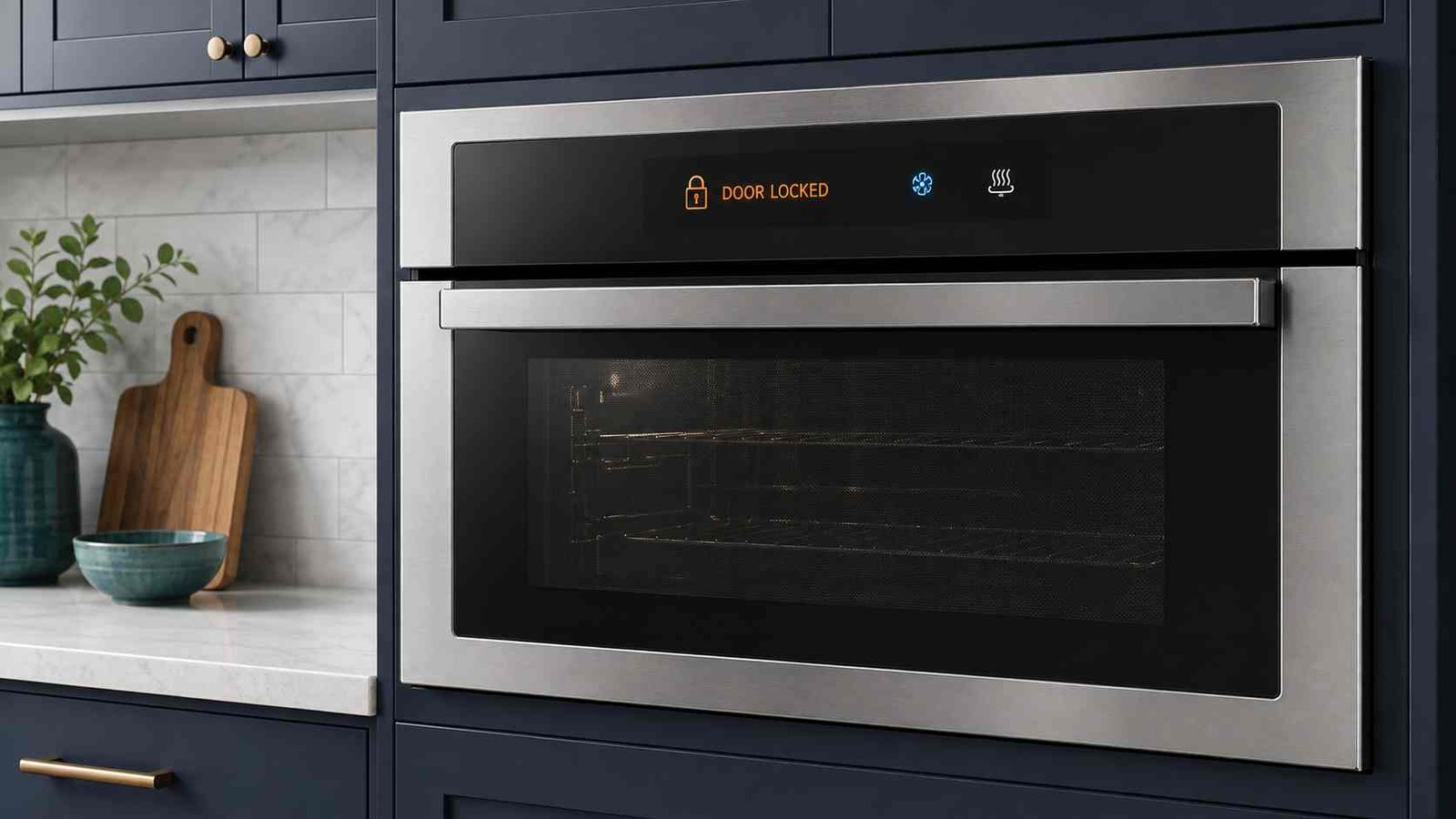
 An oven door that will not unlock is usually still being held by the self-clean safety system, an active child lock, or a control that did not complete its unlocking sequence. Start by switching the oven off and allowing it to cool completely. Cancelling a self-clean cycle does not release the door immediately because the oven may still be dangerously hot.
Do not pull hard on the handle, pry the door open, or push the latch with a tool. This can damage the latch, hinges, handle or glass. If the oven is cool, check the display for a padlock, key symbol, LOC, SAFE or a fault code. A model-appropriate power reset may help, but reset times and unlock buttons vary by manufacturer.
Stop using the oven and arrange service if the door remains locked, the latch repeatedly clicks or grinds, or a door-lock fault returns after resetting.
| Item | Details |
|---|---|
| Problem | Oven door remains physically locked |
| Most likely reason | Oven is still cooling after self-cleaning |
| Other common reasons | Child lock, control lock, power interruption or latch-system fault |
| Safe first check | Switch the oven off and let it cool completely |
| Can the door be forced? | No |
| Can the oven still be used? | Not until the door unlocks and normal operation is confirmed |
| Typical user-level difficulty | Easy to moderate |
| Professional help needed | If cooling and the correct reset do not release the door |
Why an Oven Door Stays Locked
The correct solution depends on when the door became locked and what appears on the display.
The Oven Is Still Cooling After Self-Cleaning
A self-clean or pyrolytic cycle heats the oven to a much higher temperature than normal baking. The appliance locks the door to prevent someone from opening it while the cavity is dangerously hot.
The cleaning cycle may have finished, but the lock will stay engaged until the oven reaches a safe temperature. Whirlpool states that selected wall ovens unlock at approximately 200°F or 95°C. GE says the cool-down period can take around 30 to 90 minutes on applicable ranges and wall ovens. Actual cooling time varies by model, cleaning-cycle length and room temperature.
Frigidaire, Samsung and LG also state that the door remains locked after self-cleaning until the oven has cooled sufficiently.
Control Lock or Child Lock Is Active
Some ovens have a control lock that prevents buttons from working. On certain models, the feature may also control the physical door latch.
Look for:
- A padlock or key symbol
LOC,LOCKorLOCKEDSAFE- A message stating that the controls are locked
- Buttons that beep but do not respond
The unlock method is not universal. Selected Bosch ovens use a key or lock button held for about five seconds, while Samsung procedures differ between control-panel designs. Some Samsung models use a dedicated Child Lock button, while others use the oven-light button, two timer buttons or an Options menu.
Always check the instructions printed near the control button or consult the manual for the exact model.
The Self-Clean Cycle Was Cancelled
Pressing Cancel, Clear or Off stops the active cleaning program, but it does not override the temperature safety lock. The oven must still cool before the door can open.
Whirlpool advises allowing approximately 30 to 90 minutes on selected products. The lock may take longer if the self-clean cycle was running at full temperature when it was cancelled.
A Power Failure Interrupted the Lock Sequence
The control board normally tells the latch motor when to lock and unlock. A power outage during self-cleaning can interrupt this sequence and leave the door locked after power returns.
On selected Whirlpool ovens, pressing Cancel or Off may initiate a latch reset. If that does not work, Whirlpool recommends switching the appliance off at the breaker for one minute before restoring power.
The Oven Is Switched Off
Some electronically controlled ovens need power before the latch can move. Samsung notes that the door on selected models may remain locked when the range is powered off. Restoring power and waiting briefly may allow the latch to disengage.
The Door-Lock System Has Failed
If the oven is completely cool and the correct reset does not work, possible causes include:
- Door-latch or lock assembly
- Latch motor
- Door switch
- Lock-position sensor
- Associated wiring
- Relay board
- Electronic oven control
These are possible causes, not confirmed diagnoses. Whirlpool identifies the latch assembly, door switch and associated wiring as possibilities for selected F5 E1 and F5 E2 errors. Wolf lists the motorized latch, relay board, control board and wiring as possible causes when its ovens will not unlock.
Internal testing should be left to a qualified appliance technician.
Before Trying to Unlock the Door
Take these precautions first:
- Confirm that the oven controls are set to Off.
- Keep children and pets away from the appliance.
- Allow the oven to cool fully.
- Do not touch the door glass if it still feels hot.
- Do not force the handle or latch.
- Record any error code or lock message.
- Check whether food, cookware or oven racks are trapped inside.
Safety warning: Never insert a knife, screwdriver, wire or other object around the door latch. Do not bypass the lock switch or remove appliance panels.
How to Troubleshoot an Oven Door That Will Not Unlock
Step 1: Allow the Oven to Cool Completely
This is the most important first step if the problem started during or after self-cleaning.
Press Cancel, Clear or Off once, if your control panel has that button. Then wait without repeatedly pressing controls or pulling the handle.
A cool-down period of 30 to 90 minutes is common in selected manufacturer guidance, but it is not a universal maximum. Large ovens, long cleaning cycles and poorly ventilated rooms may require more time.
Try the handle gently only after the oven has cooled.
Step 2: Make Sure the Oven Has Power
Check whether the display, clock or control lights are working.
If the oven was switched off at the wall, unplugged or disconnected at the breaker, restore power and wait briefly. On some models, the latch cannot move without electrical power.
Do not reset a breaker that immediately trips again. A repeated trip may indicate an electrical fault that needs professional attention.
Step 3: Press Cancel, Clear or Off
With the oven powered and cool, press the normal cancellation button once.
Whirlpool recommends pressing Cancel or Off and waiting approximately 20 to 30 seconds on selected ranges and wall ovens. This may start a latch-reset sequence.
Do not press random button combinations. A sequence that works on one oven may start a cleaning program or change settings on another.
Step 4: Check the Control Lock
Look carefully at the display.
If you see a key, padlock, LOC, SAFE or another lock message, find the marked Lock or Child Lock control. Hold it for the time stated on the panel or in the owner’s manual.
Examples from selected models include:
| Manufacturer | Possible control-lock method |
|---|---|
| Bosch | Hold the key or lock control for around five seconds |
| Samsung | Hold Child Lock, Oven Light or a specified button combination |
| Whirlpool | Hold Start or Enter for five seconds on selected models |
| LG | Hold Start or Lock for three seconds on selected ranges |
| Frigidaire | Hold Off for six seconds on selected ranges |
These are examples only. The exact method can differ within the same brand.
Step 5: Perform a Power Reset
Turn the oven off using its controls. Then disconnect its power at the plug, fused connection, circuit breaker or household RCD, depending on the installation.
Official reset times vary:
| Manufacturer guidance | Power-off period on selected models |
|---|---|
| GE Appliances | 30 seconds |
| Frigidaire | Up to 30 seconds |
| Electrolux | At least 30 seconds |
| Whirlpool | One minute |
| Samsung US | 60 seconds |
| LG | Five minutes |
Restore power and wait for the control to restart. Listen for the latch motor, but do not pull the door while it is moving.
Use the time specified in your owner’s manual when it differs from this table.
Step 6: Check an Older Manual Latch
Some older self-cleaning ranges have a manual sliding latch instead of a fully automatic motorized lock.
Make sure:
- The cleaning cycle has ended
- The oven is completely cool
- The selector knob is set to Off
- The temperature control is set to Off
- Clear or Off has been pressed, where applicable
Move the latch only with gentle pressure. GE warns that the latch should never be forced. Older models may require a particular knob position or cancellation action before the latch can move.
Step 7: Read Any Error Code
A displayed fault code can help separate a normal cooling lock from a failed latch system.
| Brand | Code | General meaning on applicable models |
|---|---|---|
| Whirlpool | F5 E1 or F5 E2 | Possible door-latch assembly, door switch or wiring problem |
| Frigidaire | F90–F94 | Door-lock issue |
| Electrolux | F101 or F102 | Door-lock sensor fault |
| Samsung | C-d1 | Door-lock malfunction on selected regional oven models |
The same code can mean something different on another appliance type. For example, do not use an oven code explanation for a washer or microwave.
If the code returns after one correct reset, arrange service rather than repeatedly cutting and restoring power.
Step 8: Stop When the Basic Checks Fail
If the oven is cool, the control lock is off and the correct power reset does not release the door, further homeowner troubleshooting is unlikely to help.
Leave the oven switched off and contact an authorised or qualified appliance repair service.
What to Do When Food Is Locked Inside
Food trapped in a locked oven can make the situation more urgent, but forcing the door creates a greater risk of injury and appliance damage.
Follow these steps:
- Press Cancel, Clear or Off.
- Allow the oven to cool to room temperature.
- Try the normal control-lock release.
- Perform the model-appropriate power reset.
- Arrange service if the door remains locked.
Do not restart a self-clean cycle with food, cookware, aluminium foil or other items inside.
GE provides a self-clean restart procedure for selected models only when no food or utensils are in the oven. This should not be treated as a universal unlock method.
Discard food that has remained at an unsafe temperature for an extended period.
Door Locked Even Though the Oven Is Cold
A cold locked oven points away from normal self-clean cooling and toward one of these conditions:
- Child lock remains active
- Control panel did not complete the unlock command
- Power was interrupted during cleaning
- Latch motor stopped before reaching the open position
- Door switch incorrectly reports the door position
- Lock sensor does not confirm that the latch is open
- Electronic control is not sending the correct command
Samsung recommends checking Child Lock and power-cycling the range when a cool oven remains locked. If the door still does not open, the company recommends service.
Brand and Model Differences
Whirlpool and Maytag
Selected Whirlpool-family ovens may respond to Cancel or Off followed by a 20-to-30-second wait. Whirlpool commonly recommends a one-minute breaker reset. Some wall ovens unlock when the internal temperature falls to approximately 200°F or 95°C.
GE Appliances
GE commonly recommends disconnecting power for 30 seconds. Its guidance also covers older ranges with manual latches and warns users not to force the mechanism.
Samsung
Samsung advises allowing the oven to cool, checking whether the range is powered, confirming that Child Lock is not active and power-cycling the appliance for 60 seconds on selected US models.
Control-lock instructions differ significantly between Samsung product series and regions.
LG
LG’s current US guidance recommends holding Clear or Off for more than three seconds on applicable ranges. If that fails, disconnect power for five minutes. Service is recommended if the door remains locked.
Bosch
A key symbol or LOC can indicate an active child lock on selected Bosch ovens. Bosch advises holding the key or lock button for around five seconds on many models, but the manual should be checked for the exact procedure.
Frigidaire
Frigidaire states that the door remains locked after self-cleaning until the oven has cooled sufficiently. Selected ranges may also have a separate oven-lock feature. Door-lock codes include F90 through F94 on applicable models.
Electrolux and AEG
Electrolux Australia identifies F101 and F102 as door-lock sensor faults on applicable ovens. Its guidance recommends checking that the door is fully closed, disconnecting power for at least 30 seconds and contacting an authorised service centre if the fault continues. Built-in models can be isolated at the household RCD.
Possible Faulty Parts
| Part | Possible symptoms | Homeowner repair? |
|---|---|---|
| Door-latch assembly | Door remains locked or does not fully latch | No |
| Latch motor | Repeated clicking, humming or no movement | No |
| Door switch | Control incorrectly detects an open or closed door | No |
| Lock-position sensor | Lock code returns after reset | No |
| Wiring connection | Intermittent lock operation or fault code | No |
| Relay or control board | Latch receives incorrect or no command | No |
A technician may need to remove panels and perform electrical tests to identify the actual failed part. Do not order a latch motor, switch or control board based only on the symptom.
What to Do If the Basic Fix Does Not Work
Arrange professional diagnosis when you notice any of the following:
The Lock Light Keeps Flashing
A flashing light may mean the latch is still moving, the control is waiting for position confirmation, or the lock sequence has failed.
The Latch Clicks Repeatedly
Repeated clicking suggests that the motor or control is trying to move the latch but cannot confirm the correct position.
There Is a Grinding Sound
Grinding can indicate a damaged latch mechanism or motor gearing. Stop resetting the oven and leave it switched off.
The Error Returns After Resetting
A reset may clear a temporary control problem. A returning code usually requires model-specific testing.
The Door Locked During Normal Baking
An automatic self-clean latch should not normally engage during an ordinary bake cycle. GE advises cancelling the cycle, allowing the oven to cool to room temperature and checking whether the lock releases.
Do not continue cooking until the appliance has been checked if the problem repeats.
The Breaker Trips Again
Leave the breaker off and contact a qualified professional. Repeatedly resetting a tripping circuit can be unsafe.
When to Contact a Technician
Professional service is appropriate when:
- The oven is completely cool but remains locked
- The correct control-lock procedure does not work
- One model-appropriate power reset does not help
- A door-lock error code returns
- The latch clicks, hums or grinds repeatedly
- The oven locked during normal cooking
- The handle, door glass, hinges or latch appear damaged
- The breaker or RCD trips again
- Internal wiring or appliance panels would need to be accessed
Tell the technician:
- Brand
- Complete model number
- Error code or display message
- Whether self-cleaning was running
- Whether a power outage occurred
- Whether the oven is now cool
- What reset steps were attempted
- Any clicking, humming or grinding sounds
Safety Warnings
Do not force the oven door. Pulling hard can break the handle, bend the latch, damage the hinges or stress the glass.
Do not bypass the lock. The latch is a safety device used during high-temperature cleaning.
Do not access internal wiring. Ovens may contain mains-voltage circuits even when they are not heating.
Do not restart self-clean with food inside. Remove all food and cookware before any cleaning program.
Do not remove the oven door as an unlock method. Oven doors are heavy and hinge systems can close suddenly.
Frequently Asked Questions
How long does an oven stay locked after self-cleaning?
Selected manufacturer guidance gives a cooling period of approximately 30 to 90 minutes, but some ovens may take longer. The door should open only after the appliance reaches a safe internal temperature.
Why is my oven door locked when the oven is cold?
The control lock may be active, power may have been interrupted, or the latch system may not have completed its unlocking sequence. Check the display, follow the manual’s unlock procedure and perform one correct power reset.
Will turning off the breaker unlock the oven?
It may reset the control and latch sequence, but the required power-off time varies. Official examples range from 30 seconds to five minutes. Use the time stated in the manual for your model.
Can I force open a locked oven door?
No. Forcing the door can damage the handle, glass, latch or hinges. GE specifically warns users not to force the latch.
Why does the lock light remain on after the cleaning cycle?
The oven may still be cooling. The lock and cleaning lights can remain illuminated during the cool-down period even after active cleaning has ended.
Can Child Lock physically lock the oven door?
It depends on the model. Some control locks only disable the buttons, while selected ovens also operate the physical door latch. Check the owner’s manual instead of assuming the symbols work the same across brands.
What part usually causes an oven door to stay locked?
Possible parts include the latch assembly, latch motor, door switch, position sensor, wiring or electronic control. Testing is needed before identifying the failed component.
Should I use the oven after the door finally unlocks?
You can test a basic non-cleaning function only if no error code remains and the latch operates normally. Stop using the oven if it locks again, makes unusual sounds or displays another fault.
Daniel Brooks is a US-based appliance troubleshooting researcher with 12 years of experience studying washer, dryer, refrigerator, and dishwasher faults. He reviews manufacturer manuals and converts technical error codes into safe, practical guidance for homeowners.