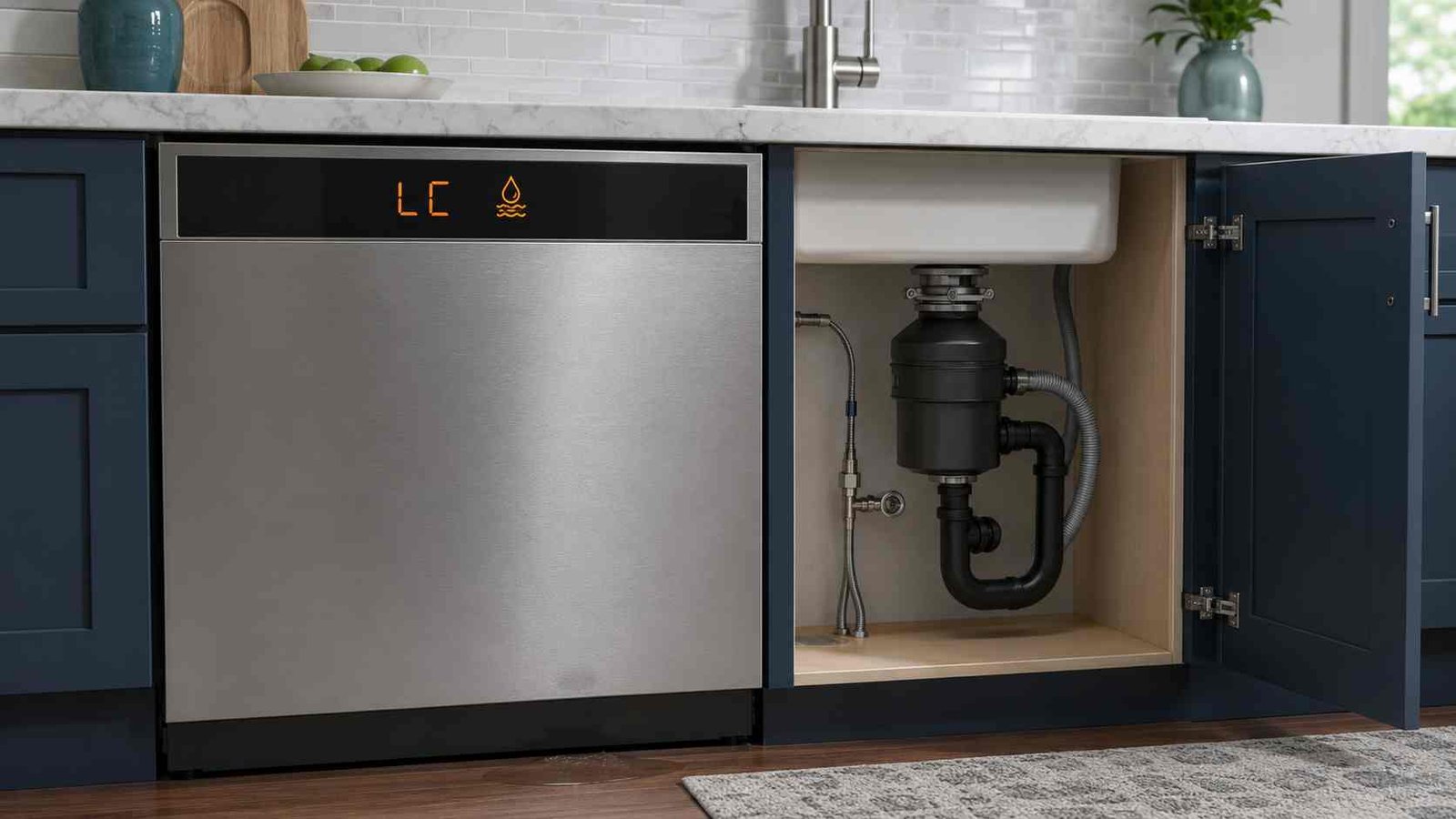
 The Samsung Dishwasher LC Error Code means the appliance’s leakage sensor has detected moisture where it should not be. Some models display LE instead, while dishwashers without a digital display may use a specific blinking-light pattern.
An LC code does not always mean there is water on your kitchen floor. A small amount of moisture may have reached the base of the dishwasher without becoming visible outside. The dishwasher may turn on its drain pump continuously as it tries to remove water.
Start by switching off the dishwasher at the circuit breaker or unplugging it with dry hands. Look for visible water around the door, supply hose, drain connection, and nearby cabinets. Do not run another cycle if water is present or the LC code returns after a reset.
Samsung LC Error Short Info
| Item | Details |
|---|---|
| Error code | LC or LE |
| Appliance | Samsung dishwasher |
| Meaning | The leakage sensor detected unexpected moisture |
| Common symptom | Dishwasher drains continuously or will not accept a new cycle |
| Safe first action | Disconnect power and check for visible water |
| Possible simple cause | Excess detergent, recent movement, hose connection, or disposal installation |
| Model-specific cause | A blocked Waterwall reflector on selected models |
| Can you keep using it? | No, not until the cause has been checked |
| Reset method | Disconnect power for 1–5 minutes after troubleshooting |
| Professional help | Required for recurring errors, internal leaks, damaged hoses, pumps, sensors, wiring, or tubs |
What Does LC Mean on a Samsung Dishwasher?
LC is a leakage-detection code. It appears when the dishwasher’s leak sensor detects moisture in the lower part of the appliance.
Samsung also uses LE for the same general condition on some models and in some regions. Dishwashers without a digital display may communicate the condition through blinking control-panel lights instead of showing letters. The correct light combination must be checked in the manual for the exact model.
The sensor may react to:
- Water from a loose or damaged hose
- Water escaping past the door seal
- Excessive detergent foam
- Spilled detergent or rinse aid
- Moisture displaced when the dishwasher was moved
- An internal pump, gasket, tub, or dispenser leak
- A blocked Waterwall reflector on selected models
The code confirms that moisture has been detected. It does not, by itself, identify the component responsible.
Why Does the Dishwasher Keep Draining?
When the leak sensor is active, a Samsung dishwasher may turn itself on and operate the drain pump continuously. This is a protective response intended to remove water.
The dishwasher may also beep, stop during a cycle, refuse to start another program, or appear not to respond to the Power button. Disconnecting its electrical supply is the appropriate way to stop the pump while checking the problem.
LC, LE, and Blinking-Light Variations
The fault may appear as:
- LC
- LE
- A model-specific combination of blinking lights
Do not assume that every blinking light means a leak. Status lights can blink during normal operation. Treat the lights as an error only when the dishwasher is not working normally and the pattern matches the model’s user manual.
Is It Safe to Use a Samsung Dishwasher With an LC Code?
Do not start another wash cycle while the LC or LE code is active.
Take these precautions:
- Switch off the dishwasher at the circuit breaker or unplug it using dry hands.
- Turn off the dishwasher’s water supply if you find a leak.
- Wipe up water around the appliance.
- Keep children and pets away from the wet area.
- Do not touch a plug, socket, switch, or appliance while standing in water.
- Do not remove the lower panel, electrical junction cover, pump, or internal wiring.
Samsung Australia advises closing the water valve, switching off the dishwasher’s circuit breaker, and contacting the installer or repair service when LC or LE appears. It also states that water in the base pan should be removed before the appliance is restarted. Base-pan access may require removal or internal work, so that step is normally better left to an installer or appliance technician.
Common Causes of the Samsung Dishwasher LC Code
1. Water Reaching the Leak Sensor
A leak does not need to be large enough to reach the floor. A small drip can collect inside the dishwasher’s base and activate the sensor.
This may explain an LC code when the kitchen floor remains dry.
2. Loose Water-Supply Connection
Check the accessible parts of the water-supply hose and its connections. Look and feel for:
- Drops of water
- Dampness
- Mineral marks
- Loose fittings
- Cracks or bulges in the hose
Switch off the water before tightening or replacing a connection. Use the installation guide for the specific dishwasher or contact an installer if the connection is difficult to reach.
3. Drain-Hose Leakage
Water may escape where the drain hose connects beneath the sink or to a garbage disposal unit. A damaged section of the hose may also leak during draining.
An accessible under-sink connection can be inspected without opening the dishwasher. Damage along the dishwasher’s internal drain hose requires service.
4. Garbage Disposal Knockout Plug
This cause mainly applies to North American installations.
A new garbage disposal normally has a plug or cap inside its dishwasher connection. That plug must be removed before the dishwasher drain hose is connected. If it remains in place, the dishwasher cannot drain correctly and water may reach the leakage sensor.
This possibility is especially important when LC appeared soon after:
- Installing a garbage disposal
- Replacing the sink
- Reconnecting the dishwasher drain hose
- Moving into a recently renovated home
5. Wrong Detergent or Too Much Detergent
Hand-washing liquid produces far more foam than automatic dishwasher detergent. The foam can move past seals or enter areas that should remain dry.
Even the correct dishwasher detergent can contribute to an LC code if too much is used or detergent is placed outside the dispenser. Samsung notes that lingering detergent can remain moist long enough to activate the sensor.
Use only detergent labelled for automatic dishwashers. Do not add extra detergent directly to the bottom of the tub unless the model manual specifically instructs it.
6. Too Much Rinse Aid
Samsung UK lists an overfilled rinse-aid dispenser as another possible leakage-code cause. Wipe away accessible spilled rinse aid with a damp cloth.
If the dispenser is cracked, will not close, or leaks repeatedly, it may need professional replacement.
7. Moisture After Moving the Dishwasher
Water remaining inside hoses or the sump can splash into the base when a dishwasher is moved, tilted, transported, or reinstalled.
Leave the dishwasher disconnected from power while the moisture dries. Samsung does not publish one universal drying period because the amount and location of moisture can vary. Restore power only when the surrounding area is dry.
8. Dirty or Misaligned Door Seal
Food particles, grease, or a displaced rubber seal can leave a gap around the door.
Clean the accessible seal with a soft cloth, mild soap, and water. Make sure the seal sits evenly in its channel. Do not pull it out or use sharp objects.
A torn, hardened, or permanently distorted seal should be assessed for replacement.
9. Dishwasher Not Level
A dishwasher leaning forward may allow water to collect near the door and escape during washing. A machine that is uneven from side to side may also have difficulty closing correctly.
Check the appliance with a spirit level if it can be done without removing it from the cabinet. Adjustment may require an installer, particularly when the dishwasher is fixed beneath a worktop.
10. Blocked Spray Nozzles
Food lodged in a spray-arm nozzle can redirect a strong stream of water toward the door seal.
With the power off, inspect accessible spray openings and remove loose food carefully. Do not force, drill, or enlarge the nozzle holes.
11. Blocked Waterwall Reflector
On selected Samsung Waterwall dishwashers, LC or LE may indicate that the moving water reflector is obstructed.
Check whether a pan handle, utensil, rack item, or fallen object is blocking its path. Do not force the reflector by hand. This Waterwall explanation does not apply to every Samsung dishwasher.
12. Internal Leak or Sensor-System Fault
If the safe external checks do not reveal the cause, the dishwasher may have an internal problem involving:
- Drain-pump gasket
- Circulation-pump seal
- Tub or sump
- Internal hose
- Detergent or rinse-aid dispenser
- Leak sensor
- Sensor wiring
- Electronic control system
These are possible technician-level causes, not a diagnosis based on the LC code alone. Samsung UK specifically identifies pump-gasket, tub, dispenser, hose, and levelling problems among the possible LC or LE causes.
How to Troubleshoot the Samsung Dishwasher LC Code
Step 1: Disconnect the Power
Turn off the dishwasher at its circuit breaker. An accessible plug may be removed with dry hands.
Do not depend on the control-panel Power button. The dishwasher may continue draining while the leak sensor remains active.
Step 2: Check for Visible Water
Inspect:
- The floor in front of the dishwasher
- The lower corners of the door
- The toe-kick area
- Adjacent cabinets
- Under the sink
- The supply-hose connection
- The drain-hose connection
Turn off the water supply if you find moisture coming from a hose or fitting.
Step 3: Check Recent Plumbing Work
Consider whether the code started after:
- Garbage disposal replacement
- Sink replacement
- Drain-hose reconnection
- Dishwasher installation
- Cabinet work
- Moving the appliance
Check that the drain connection is open and correctly installed. Do not remove the dishwasher from its cabinet unless you are qualified and can isolate both water and electrical connections safely.
Step 4: Check Detergent and Rinse Aid
Confirm that only automatic dishwasher detergent was used.
Look for:
- Heavy foam
- Soap residue
- Detergent outside the dispenser
- An overfilled rinse-aid compartment
- A damaged dispenser lid
Clean accessible spills and residue. Do not run another cycle merely to flush out foam while LC is active.
Step 5: Inspect the Door Area
Remove utensils or pan handles that prevent the door from closing. Clean the door seal and lower lip.
Check whether the racks are fully inserted and whether a large item is pressing against the door.
Step 6: Check Spray Nozzles and the Filter
Remove loose debris from accessible spray nozzles. Clean the removable filter according to the model’s user manual.
A clogged filter is listed by Samsung UK as a possible contributor to LC or LE conditions, although a dirty filter does not prove that the leak sensor itself is faulty.
Step 7: Check Waterwall Movement if Applicable
If the dishwasher is a Waterwall model, make sure dishes and utensils are not obstructing the reflector’s path.
Skip this step on dishwashers without the Waterwall system.
Step 8: Allow Recent Moisture to Dry
This is most relevant if the appliance was recently moved or installed and no ongoing leak is visible.
Keep the dishwasher disconnected from power. Do not tip it, remove panels, direct a heater into it, or bypass the sensor.
Step 9: Restore Power Once
Restore power only after:
- No active leak is visible
- Accessible connections are dry
- Detergent and rinse-aid spills are cleaned
- Any Waterwall obstruction is removed
- The appliance has remained powered off while residual moisture dried
If LC returns, disconnect power again and arrange service.
How to Reset a Samsung Dishwasher After an LC Error
A reset should be performed after troubleshooting, not as the first response.
To reset the dishwasher:
- Switch it off at the circuit breaker or unplug it.
- Leave the power disconnected for approximately one to five minutes.
- Restore power.
- Check whether LC or LE returns.
Samsung explains that a reset clears stored error information but does not repair the problem that caused the code. If moisture is still present, the LC code may return immediately.
Do not repeatedly reset and restart the dishwasher. Repeated resets can delay the identification of an active leak.
Samsung Dishwasher LC Code but No Visible Leak
An LC code without water on the floor may be caused by:
- A small hidden drip into the base
- Moisture displaced during moving
- Excess detergent remaining near the sensor
- A disposal connection that cannot drain
- A leak that occurs only during filling or draining
- A Waterwall obstruction
- An internal sensor or wiring problem
Check when the error appears. This information can help a technician narrow down the source:
| When LC appears | Possible area to investigate |
|---|---|
| Immediately after power is restored | Moisture remains at the sensor or a sensor-system fault is present |
| During filling | Supply hose, inlet connection, dispenser, or tub area |
| During washing | Door seal, spray direction, pump seal, sump, or tub |
| During draining | Drain hose, connection, drain pump, or disposal setup |
| After moving or installation | Displaced residual water or installation issue |
| After heavy foam | Wrong detergent or excessive detergent |
These patterns are clues rather than confirmed diagnoses.
What to Do if the LC Code Keeps Coming Back
Stop homeowner troubleshooting when:
- The code returns immediately after one proper reset
- Water appears beneath or inside adjacent cabinets
- The dishwasher trips its circuit breaker
- The drain pump runs whenever power is restored
- A hose is damaged in an inaccessible area
- The door seal is torn
- The dishwasher must be removed from the cabinet
- An internal pump, tub, dispenser, sensor, wire, or control is suspected
Record the full model code before requesting service. It is usually printed on a label along the dishwasher door or door-frame area.
Also note:
- When the LC code first appeared
- The stage of the cycle
- Whether water was visible
- Whether plumbing work was recently completed
- Which detergent was used
- Whether the dishwasher was moved
- Whether it is a Waterwall model
Do not use an online diagnostic-mode sequence unless it is published for your exact model. Samsung dishwasher button combinations vary, and a universal LC diagnostic procedure could not be verified.
Regional and Model Differences
Samsung uses LC and LE for leakage-related conditions across several markets, but the recommended response differs slightly.
In the United States and Canada, Samsung provides several safe checks for an LC code without a visible leak, including the supply hose, disposal cap, excess detergent, recent movement, and Waterwall obstruction.
Samsung UK lists additional possible causes such as excess rinse aid, a clogged filter, a worn drain-pump gasket, tub leakage, and forward tilting.
Samsung Australia gives a more conservative instruction: close the water valve, switch the circuit breaker off, and contact the installer or repair service. Regional model information should always be checked against the manual supplied with the dishwasher.
Frequently Asked Questions
How do I clear the LC code on a Samsung dishwasher?
Correct any visible leak or installation problem, clean detergent or rinse-aid residue, remove a Waterwall obstruction if applicable, and allow displaced moisture to dry. Then disconnect power for one to five minutes. If LC returns, request service.
Does the LC code always mean there is a visible leak?
No. It means the leak sensor detected moisture where it should not be. The moisture may remain inside the dishwasher’s base without reaching the kitchen floor.
Why does my Samsung dishwasher keep draining with LC displayed?
The dishwasher operates the drain pump as a protective response when its leak sensor is active. Disconnect the electrical supply while checking the cause.
Can too much detergent cause an LC code?
Yes. Excess detergent can remain moist around the lower dishwasher system, and excessive suds can allow moisture to escape normal wash areas. Using hand-washing liquid is particularly likely to create heavy foam.
How long does the Samsung dishwasher leak sensor take to dry?
Samsung does not give one fixed drying time. It depends on how much moisture is present and why it reached the sensor. Keep the machine powered off while it dries, and arrange service if the code remains after the surrounding area is dry.
Can I use the dishwasher if the LC code disappears?
Use it only after checking for visible leakage, accessible plumbing problems, excess detergent, and installation issues. If the code returns, stop the cycle and request service rather than continuing to reset it.
Can a garbage disposal cause the Samsung LC code?
Yes. On installations where the dishwasher drains into a garbage disposal, an unremoved knockout plug can prevent correct drainage and allow water to reach the leakage sensor.
Is the leak sensor faulty if there is no water?
It is possible, but a hidden or intermittent leak is usually something that must be ruled out first. Sensor testing requires access to internal components and should be handled by a qualified appliance technician.

Daniel Brooks is a US-based appliance troubleshooting researcher with 12 years of experience studying washer, dryer, refrigerator, and dishwasher faults. He reviews manufacturer manuals and converts technical error codes into safe, practical guidance for homeowners.