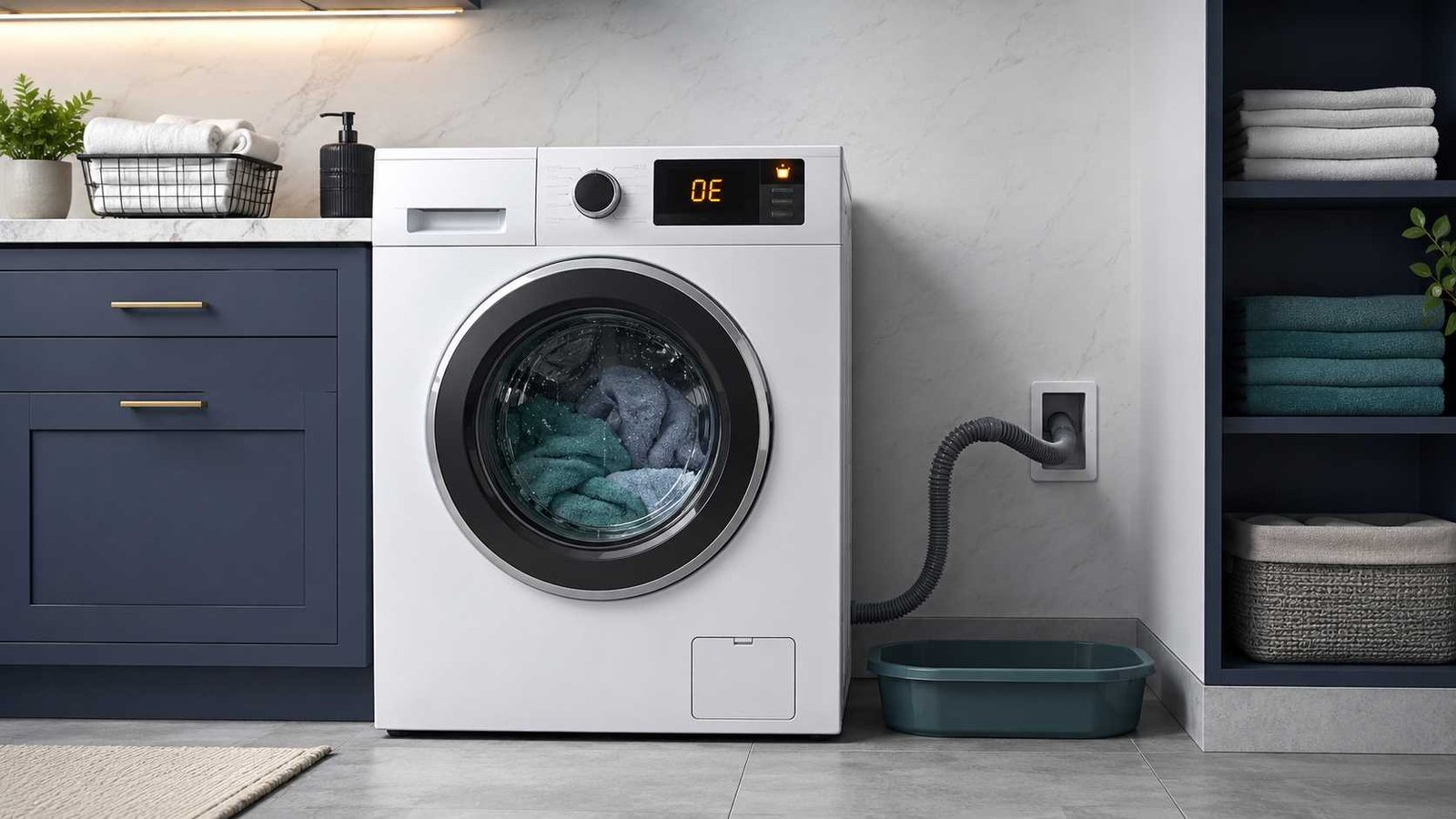
 The Samsung washer 4C or 4E error code means the washing machine is not receiving water correctly. The water may not be entering at all, may be flowing too slowly, or may be draining away before the washer detects the required level.
Start by checking that the water taps are fully open and that the inlet hoses are not kinked, crushed, frozen, or connected incorrectly. You may also need to clean the small mesh filters where the water hoses connect to the washer.
Do not continue running the washer if it fills continuously, leaks, smells burnt, trips the electrical supply, or shows signs of an internal electrical problem. Close the water taps, disconnect the washer from power when safe, and arrange professional service.
| Item | Details |
|---|---|
| Error code | 4C, 4E, 1 4C, nF, or E1 on selected models |
| General meaning | The washer is not filling with water correctly |
| Appliance | Samsung washing machine or washer |
| Most likely cause | Closed tap, restricted hose, or blocked inlet mesh filter |
| Safe first check | Open the water taps fully and inspect the inlet hoses |
| Repair difficulty | Easy external checks; internal diagnosis requires service |
| Can you keep using it? | Not until the fill problem is corrected |
| Reset method | Disconnect power for about one minute after troubleshooting |
| Professional help | Required if the code returns or the washer fills continuously |
Samsung groups 4C, 4E, 1 4C, and nF under its not-filling error category in North American guidance. Other regions may also show E1 for a similar water-supply problem. The exact code depends on the model, age, control panel, and country of sale.
What Do the Samsung 4C and 4E Codes Mean?
The 4C and 4E codes normally describe the same general problem: water is not entering the washer correctly.
The washer expects the water level to rise within a certain period. It may display the code when:
- No water enters
- Water enters too slowly
- One required water supply is unavailable
- The inlet filters restrict the flow
- The washer fills but water siphons into the drain
- The machine does not detect the expected water-level change
Samsung UK states that a blocked or kinked water-supply hose is the most common reason for the code. Samsung US also tells users to check both inlet hoses, water valves, drain-hose installation, and inlet filter screens.
Are 4C and 4E the Same Error?
On most Samsung washing machines, 4C and 4E both indicate a water-fill or water-supply problem. Older models may use 4E, while newer displays may show 4C.
Some models use other formats, including:
| Code | Usual meaning |
|---|---|
| 4C | Water is not entering correctly |
| 4E | Water-supply or not-filling error |
| 1 4C | Not-filling error on selected models |
| nF | No-fill error |
| E1 | Water-supply error on selected regional models |
| 4C2 or 4E2 | Incorrect water temperature or reversed inlet hoses |
Do not confuse 4C or 4E with 4C2, 4E2, CE, 14C2, or nF1. Samsung identifies these related codes as hot-and-cold water errors, commonly caused by reversed hose connections or unusually hot water entering the cold inlet.
Common Symptoms
The washer may show the code at the start of the wash, while rinsing, or after attempting to fill for several minutes.
You may notice that:
- The drum remains empty
- Only a small amount of water enters
- The washer makes a humming sound but does not fill
- The cycle pauses before washing begins
- The code appears only on warm or hot cycles
- The code appears during the rinse stage
- Water enters and immediately runs into the drain
- The washer drains automatically after displaying the code
- The control buttons temporarily stop responding
Samsung Australia notes that some models may automatically start draining after a fill-related information code appears. Buttons may be disabled while that process is underway.
Most Common Causes
1. The Water Tap Is Closed
A partly closed tap may provide enough water for a sink but not enough flow for the washer to fill within the expected time.
Check every tap connected to the machine. Open it fully unless your model’s installation instructions state otherwise.
2. A Water Inlet Hose Is Kinked
A washer pushed too close to the wall can crush or bend its hoses. The restriction may be obvious, or it may occur behind the appliance where it is difficult to see.
Check for:
- Sharp bends
- Flattened sections
- Damage near the hose connectors
- Twisting behind the washer
- Objects pressing against the hose
- Frozen plumbing in cold conditions
Replace a damaged hose rather than trying to straighten or patch it. Samsung also advises against certain flow-restricting Flood Safe hoses on its North American machines.
3. The Inlet Mesh Filters Are Blocked
Small mesh screens are fitted inside the washer’s water-inlet connections. They catch sand, rust, pipe scale, and other debris before it enters the machine.
As debris accumulates, the washer may receive some water but not enough to complete the fill process. Samsung UK recommends cleaning these filters regularly and checking that the connections remain watertight afterwards.
4. Water Pressure or Flow Is Too Low
Low household water pressure, a restricted plumbing valve, shared water use, or a partially blocked pipe can reduce the fill rate.
Samsung UK guidance for applicable models gives a supply-pressure range of 0.5 to 8 bar. That figure should not be assumed for every country or model. Check the installation section of your exact user manual before using pressure specifications for diagnosis.
5. Hot and Cold Hoses Are Incorrectly Connected
North American Samsung washers commonly require both hot and cold supplies to be connected correctly. Some cycles labelled Cold may still mix in hot water under certain conditions.
The machine may display 4C or 4E when it requests water from a supply that is closed or not connected. If the hoses are reversed, it may instead display 4C2, 4E2, CE, or a similar temperature-related code.
6. The Detergent Drawer Is Blocked
On selected machines, detergent or fabric-softener residue can obstruct water flow through the dispenser area.
Samsung Australia states that a blocked detergent drawer can occasionally contribute to a 4C code and recommends cleaning the drawer to prevent build-up.
7. The Drain Hose Is Causing Siphoning
A washer can receive water correctly but lose it through the drain hose if the hose is installed too low, pushed too far into the standpipe, sealed airtight, or removed from its original retaining holder.
This continuous loss of water can prevent the machine from reaching the expected level, leading to a fill error.
Installation measurements vary. For example, Samsung US provides standpipe insertion and height limits for its supported models, while Samsung Australia gives a different regional drain-hose height range. Always use the measurements in the manual supplied with your washer.
8. A Component May Have Failed
When all external checks are satisfactory, possible technician-level causes may include:
- Water inlet valve
- Water-level or pressure sensor
- Pressure or air hose
- Electrical connector or wiring
- Control board
These are possible causes, not confirmed diagnoses. Determining which part is responsible may require model-specific service documentation, electrical measurements, and access to internal components.
Safety Checks Before You Begin
Before disconnecting any hose:
- Stop the wash cycle.
- Switch off the washer.
- Unplug it from the wall outlet when accessible.
- Close both water-supply taps.
- Allow hot-water connections to cool.
- Place towels and a shallow container behind the washer.
- Ask for help before moving a heavy appliance.
Do not remove control panels, test live voltage, bypass a safety device, or work on internal wiring. Stop if water is leaking from inside the cabinet or the washer continues filling after it should have stopped.
Samsung specifically advises closing the water valves and arranging service when a machine fills continuously.
How to Fix the Samsung Washer 4C or 4E Error
Step 1: Confirm the Exact Code
Check whether the display reads:
- 4C
- 4E
- 4C2
- 4E2
- nF
- nF1
- E1
A small second digit changes the diagnosis. A 4C2 or 4E2 code is normally related to the temperature or connection of the incoming water rather than a basic lack of water.
Step 2: Open the Water Taps Fully
Find the hot and cold taps or the single inlet tap used by your regional model.
Make sure each required tap is fully open. If another appliance or tap shares the same plumbing line, stop using it temporarily and test the washer again.
Step 3: Inspect the Inlet Hoses
Carefully move the washer forward without pulling tightly on the hoses or power cable.
Look for:
- Kinks
- Pinching
- Cracks
- Bulges
- Twisted connectors
- Frozen sections
- A hose trapped under the appliance
Correct the hose position or replace the hose if it is damaged.
Step 4: Check Hot and Cold Connections
Where two supplies are required:
- Connect hot to the hot inlet
- Connect cold to the cold inlet
- Open both taps
- Confirm that neither hose is crossed behind the washer
Colours are often used to identify connections, but do not rely on colour alone. Check the labels on the washer and taps.
Step 5: Check Water Flow
Close the taps before loosening the hoses.
Disconnect the inlet hose from the washer or tap according to the layout of your installation. Place the hose into a bucket, then briefly open the tap to confirm that water flows strongly and continuously.
Close the tap immediately after the test. If the flow is weak, the problem may be in the household tap, plumbing, hose, or water supply rather than inside the washer.
Use caution with hot water. Do not perform this test when the hose, tap, or connection is too hot to handle safely.
Step 6: Clean the Inlet Mesh Filters
With the washer unplugged and the water taps closed:
- Disconnect the inlet hoses from the back of the machine.
- Look inside each washer inlet for a small mesh screen.
- Remove the filter gently if the model instructions allow it.
- Rinse away dirt under running water.
- Clean carefully without tearing or deforming the mesh.
- Refit the screens securely.
- Reconnect the hoses.
- Open the taps slowly.
- Check every connection for leaks.
Samsung UK advises reconnecting the hose first to the washing machine and then to the water supply, while confirming that all connections are watertight. Procedures can differ slightly, so follow the manual for your model.
Step 7: Clean the Detergent Drawer
Remove the drawer according to the user manual.
Rinse away thick detergent, softener, or mould residue. Pay attention to the water channels above and around the drawer, but do not force tools into internal openings.
Refit the drawer fully before testing the washer.
Step 8: Inspect the Drain Hose
Check that the drain hose:
- Is not kinked
- Has not fallen onto the floor
- Is secured in its original holder
- Is not pushed too far into the drain
- Does not form an airtight seal
- Is installed at the height required by the model manual
Do not remove the screw or holder securing the drain hose to the back of the washer. Samsung warns that removing this holder can allow automatic draining and contribute to an LC or 4C error.
Step 9: Reconnect and Check for Leaks
Open the taps slowly after reconnecting the hoses.
Inspect both ends of every inlet hose. A connection can appear dry initially and begin dripping after pressure builds. Tighten connections by hand as directed by the manufacturer, without damaging plastic threads.
Step 10: Run a Test Cycle
Run a short empty cycle without detergent.
Watch and listen for:
- Normal water entry
- Slow filling
- Water immediately entering the drain
- Leaking hose connections
- The code returning during wash or rinse
Record the exact point at which the code appears. This information can help a technician distinguish a supply restriction from a valve or water-level sensing problem.
How to Reset a Samsung Washer After a 4C or 4E Code
Correct the water-supply or installation problem before resetting the washer.
For a basic power cycle:
- Switch off the washer.
- Unplug it or switch off its dedicated circuit breaker.
- Leave the power disconnected for about one minute.
- Restore power.
- Run a short test cycle.
Samsung Australia advises waiting two to three minutes on some regional models, while current Samsung Canada guidance describes a one-minute power cycle. Follow the procedure in your model manual where it differs.
A reset does not repair a closed tap, blocked filter, faulty valve, or incorrect hose installation. Samsung warns that repeating resets may clear useful error history and make later service diagnosis more difficult. Reset once after completing the checks rather than repeatedly clearing the display.
What If Water Enters but 4C Still Appears?
A visible stream of water does not prove that the washer is filling correctly.
The code can still appear when:
- The water enters too slowly
- Only one inlet works
- The machine requests hot water but none is available
- Water is siphoning into the drain
- The inlet valve opens only partly
- The water-level system does not detect the rising level
- The code occurs only during a particular stage of the cycle
Check whether the error happens during the first fill, a warm-water stage, or the rinse. Also watch the drain hose. If water can be heard flowing into the drain while the washer fills, review its installation before assuming an internal part has failed.
If the external checks are complete and the code remains, stop resetting the machine and request model-specific service.
Front-Load and Top-Load Differences
The basic meaning of 4C or 4E is similar on Samsung front-load and top-load washers, but the physical layout can differ.
A front-load model may have:
- Two rear water inlets
- A removable front detergent drawer
- A low-mounted pump filter
- A drain hose fixed to a rear retaining bracket
A top-load model may use:
- Different inlet arrangements
- A detergent dispenser inside or around the tub
- Different cycle names
- Deep Wash or Deep Fill options on selected models
A Deep Fill option is not a repair for an active 4C or 4E error. It may alter the water level on supported cycles, but it will not correct a closed tap, blocked filter, or defective component. Samsung notes that cycle availability varies by model.
Regional and Model Differences
United States and Canada
Samsung’s North American guidance commonly expects hot and cold hoses to be connected correctly. It also gives model-specific limits for standpipe insertion and drain-hose height and advises a one-minute power cycle after correcting the installation.
United Kingdom and Ireland
Samsung UK and Ireland guidance focuses on mains water flow, a fully opened tap, inlet-hose condition, mesh-filter cleaning, and dispenser cleaning. Applicable UK guidance lists a water-pressure range of 0.5 to 8 bar.
Australia and New Zealand
Australian and New Zealand machines may display 4C, 4E, E1, or nF for a not-filling condition. Some models may drain automatically and temporarily disable controls after displaying the code.
Models Without a Digital Display
Some Samsung washers use combinations of blinking temperature or water-level lights instead of an alphanumeric code. Treat blinking lights as an error only when the machine is also behaving abnormally, and consult the model manual to identify the exact pattern.
When to Call a Technician
Arrange professional service when:
- The code returns after every external check
- Both taps have good flow but no water enters
- Water enters continuously
- The washer leaks from inside the cabinet
- The washer trips a breaker
- There is a burning smell
- A hose connection or inlet fitting is damaged
- The drain-hose retaining bracket is missing
- The inlet valve or water-level system is suspected
- Internal panels would need to be removed
- The model manual gives different instructions that you cannot complete safely
A technician may need to test the inlet valve, pressure sensor, pressure hose, wiring, connectors, or control board. Do not order parts based only on the error code.
Can You Continue Using the Washer?
Do not continue normal washing while the 4C or 4E code remains.
The washer may stop repeatedly, fail to rinse detergent from clothes, drain unexpectedly, or place additional strain on the fill system. Correct the cause, check all hose connections for leaks, and complete a successful test cycle before returning to normal use.
If the machine fills continuously, close the water valves immediately and arrange service.
How to Prevent the Error Returning
- Keep the washer far enough from the wall to prevent crushed hoses.
- Inspect hoses regularly for kinks, cracks, and bulges.
- Clean the inlet mesh filters according to the model manual.
- Keep the detergent drawer free from hardened residue.
- Leave hot and cold taps fully open where both are required.
- Secure the drain hose at the correct height.
- Do not push the drain hose too deeply into the standpipe.
- Protect exposed pipes and taps from freezing.
- Record recurring codes instead of repeatedly resetting the washer.
Samsung UK recommends cleaning the water-hose mesh filters at least twice a year for the models covered by its guidance. Some newer Samsung laundry products provide their own cleaning interval, so the model manual should take priority.
Frequently Asked Questions
Are Samsung 4C and 4E the same code?
Usually, yes. Both normally mean the washer is not receiving water correctly. The displayed format depends on the model and region.
How do I clear the 4C code on a Samsung washer?
First correct the water-supply problem. Then disconnect power for about one minute and restart the washer. Do not rely on the reset alone because the code will return if the underlying fault remains.
Why does my Samsung washer show 4C when the water is on?
The tap may be open but the flow may still be restricted by a kinked hose, blocked mesh filter, low pressure, incorrect hose connection, or siphoning drain hose. An internal valve or water-level fault is also possible after external causes have been ruled out.
Can a blocked detergent drawer cause the code?
Yes, on selected models. Samsung Australia states that a blocked detergent drawer can occasionally contribute to a 4C error.
What is the difference between 4C and 4C2?
The basic 4C code is a not-filling error. The 4C2 code usually means the water entering through the cold supply is too hot, often because the hot and cold hoses are reversed.
Does the 4E code mean the inlet valve is faulty?
Not necessarily. Closed taps, low flow, kinked hoses, clogged filters, and drain-hose problems are more appropriate first checks. The inlet valve becomes a possible cause when the water supply is confirmed but the washer still cannot fill.
Can I use only the cold-water hose?
This depends on the model and market. Some North American Samsung washers may request hot water even during certain Cold cycles. Check the installation manual before operating the washer with only one supply connected.
Why does the washer drain after displaying 4C?
Some models automatically drain after a fill-related information code. Water may also siphon away when the drain hose is installed too low, too deeply, or without the correct retaining position.
Daniel Brooks is a US-based appliance troubleshooting researcher with 12 years of experience studying washer, dryer, refrigerator, and dishwasher faults. He reviews manufacturer manuals and converts technical error codes into safe, practical guidance for homeowners.