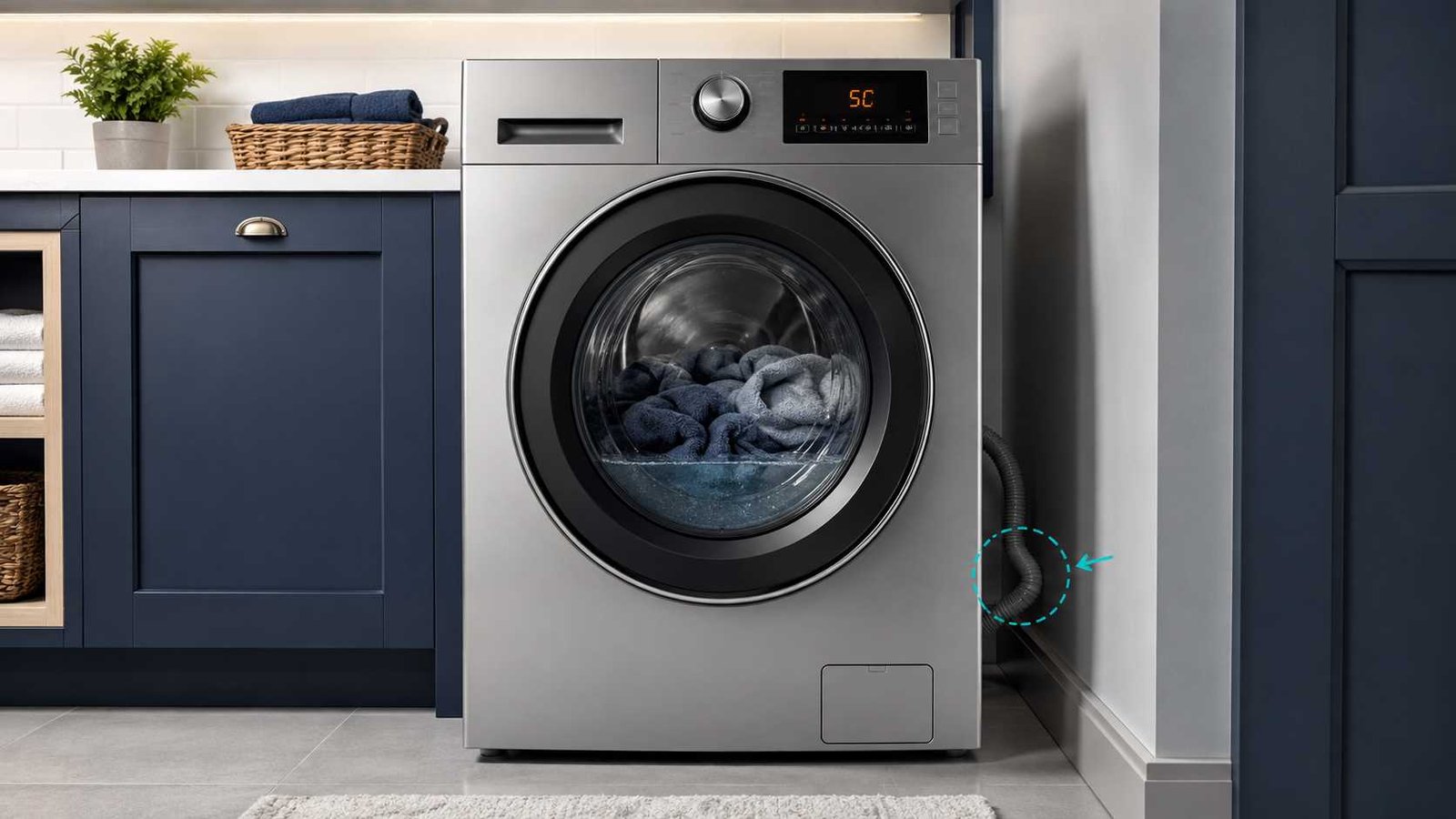
 The Samsung Washer 5C Error Code means the washing machine cannot drain water at the expected speed or cannot drain it at all. Depending on the model and country, the same general drainage problem may appear as 5E, SC, SE, nd or 1 5C.
Start by turning off the washer and checking the visible drain hose for kinks, crushing or an incorrect standpipe connection. On an applicable front-load washer, you may also need to drain the remaining water and clean the pump filter.
Do not open the filter while the drum contains hot water. If a hot cycle has recently run, allow the water to cool before draining it. Stop using the washer and arrange service if the code returns after the accessible filter and hose checks.
Samsung 5C Error Quick Answer
| Item | Details |
|---|---|
| Error code | 5C |
| Meaning | The washer is not draining correctly |
| Appliance | Samsung washing machine |
| Related codes | 5E, SC, SE, nd and 1 5C on selected models |
| Common causes | Blocked pump filter, kinked hose or incorrect drain-hose installation |
| First safe check | Turn off the washer and inspect the visible drain hose |
| Front-load check | Drain the water and clean the accessible pump filter |
| Top-load check | Inspect the hose; most top-load models do not have a removable front pump filter |
| Can you keep using it? | Not until the drainage problem is corrected |
| Service may be needed when | The code returns after the filter, hose and installation checks |
What Does 5C Mean on a Samsung Washer?
Samsung classifies 5C as a no-drain error. The washer has detected that water is leaving too slowly or not leaving at all۔
This may cause the washer to:
- Stop before completing the cycle
- Leave water inside the drum
- Leave clothes unusually wet
- Refuse to enter a high-speed spin
- Keep the door locked
- Take much longer than expected to finish
The code does not automatically prove that the drain pump has failed. A simple obstruction, kinked hose or installation problem can produce the same warning.
Is 5C the Same as 5E, SC, SE or nd?
These codes commonly belong to Samsung’s no-drain error family:
- 5C
- 5E
- SC
- SE
- nd
- 1 5C
The exact code format depends on the washer model, display design and market. Samsung US groups these codes under the same general no-drain condition, while Samsung UK commonly presents 5C and 5E together.
Always check the manual for the complete model number before relying on a model-specific procedure.
Most Common Causes of a Samsung Washer 5C Error
1. Blocked drain-pump filter
On many Samsung front-load washers, the pump filter catches lint, coins, hair, clips and other small objects before they reach the drain pump.
As debris builds up, water may drain slowly or stop draining. Samsung UK identifies a blocked filter as one of the most common causes of 5C and 5E errors.
2. Kinked or crushed drain hose
A hose trapped behind the washer may restrict water flow. The washer may begin draining normally but fail to remove the water within the expected time.
Look for:
- Sharp bends
- Flattened sections
- Twisting
- Damage
- Furniture or the washer pressing against the hose
3. Incorrect drain-hose installation
The hose must be positioned at the correct height and should not create an airtight seal inside the household drain.
For US installations, Samsung commonly advises that the hose should enter the standpipe or sink connection by approximately 6 to 8 inches, remain secured and not form an airtight connection. Exact height limits depend on the installation type and model.
Other regions use different measurements, so follow the installation manual supplied for your country and model.
4. Blocked household drain connection
The washing machine may work correctly, but the sink waste pipe, standpipe or shared drain connection may be restricted.
Possible signs include:
- Water rising inside the standpipe
- A sink filling when the washer drains
- Slow drainage elsewhere in the room
- Water backing up around the drain connection
A blocked household drain normally requires plumbing attention rather than washer repair.
5. Washer not level
Samsung includes washer levelling among its initial no-drain checks. An incorrectly levelled appliance may not operate or drain as intended.
Check the washer from side to side and front to back. Adjust only the levelling feet according to the installation manual.
6. Service-level drainage fault
When the hose is correctly installed and the accessible filter is clear, the washer may need internal diagnosis.
The 5C display identifies a drainage failure, but it does not confirm a particular failed part. Further checks may involve pump operation or another internal part of the drainage system. Samsung recommends service when the washer still does not drain after the approved homeowner checks.
Safety Checks Before Troubleshooting
Disconnect the washer from power before opening a filter cover, handling an emergency drain hose or cleaning the pump filter.
Also follow these precautions:
- Turn off the washer.
- Unplug it from the wall outlet.
- Keep towels and shallow containers nearby.
- Do not force open a locked door.
- Do not remove rear or lower appliance panels.
- Do not test live wiring or pump voltage.
- Do not reach into the filter opening while the washer is connected to power.
If a Sanitize, Pure Cycle or another hot programme has recently run, Samsung advises allowing approximately one hour for the water to cool before beginning the draining procedure.
How to Fix the Samsung Washer 5C Error
Step 1: Turn off and unplug the washer
Press Power, then disconnect the plug from the outlet.
If the washer is hardwired or the plug cannot be reached safely, switch off the correct circuit breaker. Do not proceed unless you can disconnect power safely.
Step 2: Check that the washer is level
Place a bubble level on top of the machine if one is available.
Check:
- Left to right
- Front to back
- Whether all feet touch the floor
- Whether the washer rocks when gently pressed
Adjust the feet only as described in the product manual.
Step 3: Inspect the visible drain hose
Follow the hose from the rear of the washer to the drain connection.
Confirm that it:
- Is not kinked or folded
- Is not crushed behind the machine
- Is not visibly damaged
- Has not slipped too far into the standpipe
- Is not sealed tightly inside the drain
- Is supported at the correct height
Samsung says incorrect hose installation is a common reason for drainage problems and advises checking the model’s installation instructions.
Do not remove the factory hose-retaining screw from the back of the washer. Samsung advises arranging service if the holder is missing.
Step 4: Check the household drain connection
Look at the standpipe, sink waste connection or laundry-tub drain.
Remove only visible debris that can be reached without dismantling plumbing. If the household drain backs up or drains slowly, contact a plumber.
Step 5: Drain trapped water from a front-load washer
This procedure applies only to models fitted with an accessible emergency drain hose.
- Confirm the washer is unplugged.
- Place towels on the floor.
- Open the small filter-access cover near the lower front of the washer.
- Pull out the emergency drain tube.
- Position the tube over a large, shallow container.
- Remove the tube cap carefully.
- Allow the water to drain.
- Replace or empty the container as needed.
- Refit the tube cap securely.
- Return the tube to its storage position.
Samsung warns that a large amount of water may come out, so keep an additional container ready.
Do not unscrew the pump filter until the emergency tube has stopped releasing water.
Step 6: Clean the pump filter on an applicable front-loader
After draining the water:
- Turn the filter knob slowly.
- Pull out the filter.
- Remove lint, coins, hair and other debris.
- Check the filter cavity for visible obstructions.
- Rinse the removable filter under clean water.
- Reinstall it in the correct position.
- Tighten it securely by hand.
- Close the access cover.
Do not use excessive force or tools to tighten the filter.
A loose or incorrectly fitted filter can allow water to leak during the next cycle.
Step 7: Reconnect power and test the washer
Restore power after the hose, emergency tube and filter are securely refitted.
Run a short rinse, drain or test cycle allowed by your model. Watch the drain connection and filter area for leaks.
The washer should begin draining during the test. Samsung advises requesting service if it still does not drain.
Samsung 5C Error on a Top-Load Washer
Do not assume that a Samsung top-loader has the same lower-front pump filter as a front-load machine.
Samsung US states that its removable pump-filter cleaning step applies to front-load washers because top-load washers do not have the same user-removable filter.
For a top-loader:
- Turn off and unplug the washer.
- Check that the machine is level.
- Inspect the entire visible drain hose.
- Check the standpipe or sink connection.
- Confirm the hose is not inserted too far or sealed airtight.
- Restore power and run an appropriate drain or spin test.
Do not remove the cabinet or tip the washer over to reach the pump. Arrange service if the code returns.
What if the Samsung 5C Error Appears but the Filter Is Clean?
A clean filter rules out only one possible restriction.
Work through the following checks:
Inspect the entire drain-hose route
A kink may be hidden directly behind the machine or where the hose enters a cabinet.
Check the standpipe insertion
A hose pushed too deeply into the drain may contribute to siphoning or drainage problems. Use the measurements in the installation guide for your exact model.
Check for an airtight connection
The hose should not be taped, sealed or packed tightly into the standpipe unless the installation manual specifically requires a fitted connection.
Observe the draining sound
A normal draining sound with little or no water movement may suggest a blockage farther along the drainage path.
Complete silence during the expected drain stage may require professional diagnosis. Sound alone cannot confirm a failed pump.
Check whether the code appears immediately or after slow draining
An immediate error and a slow-draining error can feel different, but both still require the same initial checks.
Avoid repeated cycles while water remains inside, as this may leave more water in the drum without resolving the cause.
How to Reset a Samsung Washer After a 5C Error
Samsung explains that its washers do not have a universal error-code reset button. The closest procedure is a power cycle:
- Unplug the washer or switch off its circuit breaker.
- Wait approximately one to five minutes.
- Restore power.
- Start an appropriate test cycle.
A power cycle may clear a temporary electronic condition, but it does not remove a blocked filter, straighten a hose or correct a drain installation problem.
Samsung recommends completing the troubleshooting first. If the code returns, repeatedly resetting the washer may erase useful error history and make diagnosis more difficult.
Diagnostic Testing on Compatible Samsung Washers
Some Samsung washers support an onboard installation or diagnostic test containing a drain check. During supported tests, the washer attempts to drain and displays 5C if that part of the test fails.
However, diagnostic entry sequences vary by control-panel design and model.
Do not use a button combination copied from an unrelated washer. Check the manual or Samsung support page for the complete model number.
Samsung also states that Smart Install is intended to check for errors and should not be started when the machine is already displaying an error code.
Regional Drain-Hose Differences
United States and Canada
Samsung US commonly specifies that the hose should:
- Enter the standpipe or sink connection by about 6 to 8 inches
- Be secured against slipping
- Avoid an airtight connection
- Remain within the model’s permitted drain height
Exact requirements differ between standpipes and wash basins.
United Kingdom and Ireland
Samsung UK commonly advises checking that the hose is straight, clear and correctly installed. Its error-code guidance states that the outlet drain hose should be installed at a height of at least 60 cm on applicable models.
Australia and New Zealand
Samsung Australia commonly lists a drain-hose height of approximately 60 to 90 cm for applicable washers and advises checking for kinks and obstructions.
These measurements are general regional guidance. The manual supplied with the washer takes priority.
Can You Keep Using a Samsung Washer With a 5C Code?
Do not continue normal washing while the code remains active.
The washer may be unable to remove water, complete a rinse or reach a safe high-speed spin. Repeatedly restarting it may leave more water inside without solving the obstruction.
Stop using the appliance immediately when:
- Water is leaking
- The plug or outlet is wet
- There is a burning smell
- The pump area makes a harsh grinding noise
- The drain hose is split
- The circuit breaker trips
- The washer has moved or become unstable
Disconnect power only when it is safe to reach the plug or breaker.
When to Call a Technician
Arrange professional service when:
- The 5C code returns after cleaning the applicable filter
- The hose is correctly positioned and free from visible kinks
- The household drain is clear
- The washer makes no normal draining sound
- The filter cannot be removed or reinstalled safely
- Water leaks from the filter area
- The washer requires cabinet removal
- The drain pump or internal hoses require testing
- The code appears during a Samsung diagnostic drain check
- The washer still contains water after the approved emergency-drain procedure
Do not attempt live voltage checks, internal wiring repairs or pump replacement unless you are qualified and have the correct service documentation.
How to Help Prevent Future 5C Errors
- Empty pockets before loading clothes.
- Remove coins, clips and small objects.
- Check the accessible front-load filter periodically.
- Keep the drain hose free from pressure and sharp bends.
- Do not push the washer tightly against the wall.
- Follow the correct drain-hose installation measurements.
- Use the correct type and amount of detergent.
- Investigate slow drainage before the washer stops completely.
Filter-cleaning intervals can differ by model. Follow the maintenance schedule in the owner’s manual.
Frequently Asked Questions
What does 5C mean on a Samsung washer?
It means the washer is not draining water at the required speed or is not draining at all. Common causes include a blocked front-load pump filter, kinked hose or incorrect drain-hose installation.
How do I clear the Samsung Washer 5C Error Code?
Correct the drainage problem first. Check the hose, clean the applicable front-load filter, then power-cycle the washer for one to five minutes and run a test cycle.
Why does the 5C code remain after cleaning the filter?
The hose may still be kinked, incorrectly installed or blocked. The household drain may also be restricted. If those checks are clear, professional diagnosis may be required.
Does a Samsung top-load washer have a drain-pump filter?
Samsung US states that top-load washers do not have the same removable pump filter used in its front-load troubleshooting procedure. Check the manual before searching for or opening any filter area.
Can I open the door while the washer contains water?
Do not force the door. On applicable front-load models, use the emergency drain hose after disconnecting power and allowing hot water to cool.
Will unplugging the washer fix the 5C error?
It may clear a temporary electronic issue, but it will not repair a blockage or installation problem. Samsung recommends troubleshooting the cause before relying on a reset.
Is 5C the same as 5E?
They generally identify the same no-drain condition on different Samsung models or regional displays. Check the manual for the exact model to confirm its code format.
Does a 5C code always mean the drain pump is faulty?
No. The code confirms that drainage is too slow or has stopped, but it does not identify one failed part. Check the accessible filter, hose, drain installation and household waste connection before arranging internal diagnosis.
Daniel Brooks is a US-based appliance troubleshooting researcher with 12 years of experience studying washer, dryer, refrigerator, and dishwasher faults. He reviews manufacturer manuals and converts technical error codes into safe, practical guidance for homeowners.