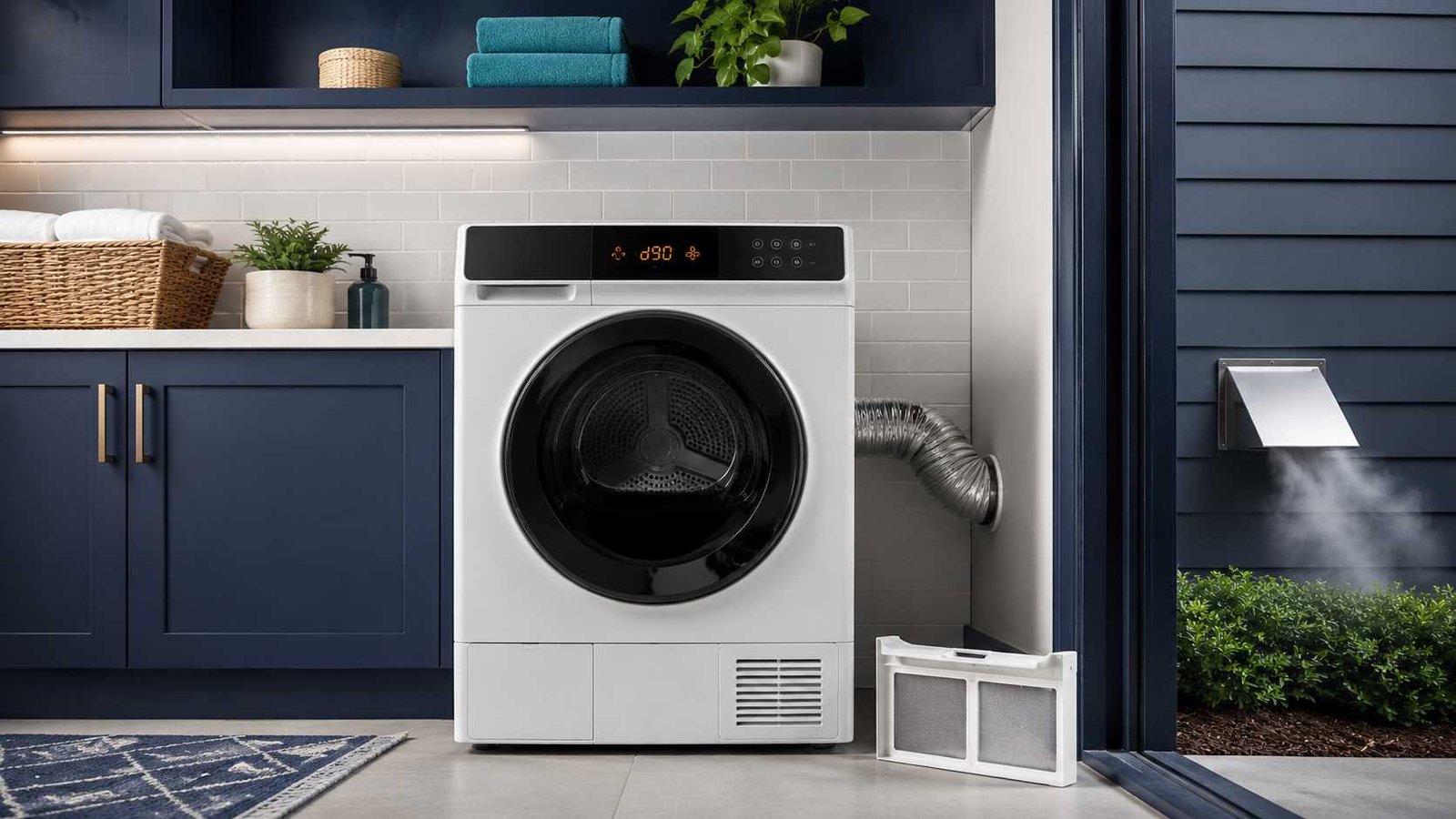
 The LG dryer d90 error code means the dryer has detected a severe restriction in the exhaust airflow. LG describes d90 as approximately 90% blockage in the ductwork between the dryer and the outdoor vent outlet. This warning needs prompt attention because restricted airflow can increase drying time, trap heat and moisture, and create unsafe operating conditions.
In most cases, the dryer itself has not failed. The problem is more likely to be a clogged lint filter, crushed transition hose, blocked exterior vent, lint buildup inside the wall duct, or an exhaust system that is too long or has too many bends.
LG Dryer d90 Quick Answer
| Question | Answer |
|---|---|
| What does d90 mean? | The dryer has detected approximately 90% exhaust restriction. |
| Where is the problem? | Usually in the lint filter, hose, wall duct, or outdoor vent hood. |
| Can I keep using the dryer? | LG advises against using it until a severe exhaust restriction is cleaned or repaired. |
| Will resetting fix it? | No. A reset may clear the display temporarily, but it cannot remove a blockage. |
| Who should inspect it? | A professional dryer-vent cleaner should inspect concealed ductwork. An appliance technician is appropriate if the code remains after the vent is verified clear. |
What Does d90 Mean on an LG Dryer?
On LG dryers equipped with the Flow Sense system, d90 is an airflow warning. The dryer monitors how easily hot, moist air can move through the exhaust system.
When the dryer displays d90, LG says it has detected about a 90% restriction in the ductwork. The restriction can be anywhere along the exhaust path:
Dryer drum → lint filter → internal exhaust outlet → transition hose → wall duct → exterior vent hood
A d90 code does not automatically mean the heating element, control board, temperature sensor, or motor has failed. It usually means the dryer cannot push air outside efficiently.
Because the dryer cannot release moisture properly, you may also notice:
- Clothes remain damp after a complete cycle
- Drying takes much longer than normal
- The dryer stops before clothes are dry
- The cabinet or laundry area feels unusually warm
- Airflow from the outside vent is weak
- The Flow Sense indicator shows multiple bars
- The d90 warning returns during high-heat cycles
Is It Safe to Use an LG Dryer Showing d90?
You should not ignore a d90 warning or repeatedly restart the dryer without checking the vent system.
LG specifically warns that operating a dryer with a severely restricted exhaust can create an unsafe environment and recommends not using the dryer until the exhaust system has been cleaned or repaired.
Lint buildup can reduce airflow and allow excessive heat to collect in the dryer or duct. The US Consumer Product Safety Commission advises homeowners to clean the lint screen, exhaust duct, and dryer vent regularly because accumulated lint can contribute to overheating and fires.
Stop using the dryer immediately when you notice:
- A burning or scorching smell
- Smoke from the dryer or vent
- An unusually hot power cord, plug, wall outlet, or dryer cabinet
- Little or no airflow outside
- Repeated shutdowns
- A damaged electrical cord
- A loose or damaged gas connection
Do not open appliance panels, bypass Flow Sense, disable a thermal safety device, or continue running repeated test cycles when the dryer is overheating.
Common Causes of the LG Dryer d90 Error Code
1. Clogged Lint Filter
The lint filter is the safest and easiest place to check.
A filter covered with lint reduces the amount of air that can move through the dryer. Some filters may look clean but have a thin coating from dryer-sheet or fabric-softener residue.
LG recommends cleaning the filter after every load. For a more thorough cleaning, it can be washed using warm water and a soft brush, then dried completely before being reinstalled.
2. Oversized Dryer Load
A tightly packed drum can reduce internal air circulation. Large blankets, towels, comforters, and mixed heavy fabrics may prevent air from moving properly through the load.
LG includes reducing the load size among its recommended steps for Flow Sense warnings.
3. Crushed or Kinked Exhaust Hose
The flexible or semi-rigid duct between the dryer and the wall can become compressed when the dryer is pushed too close to the wall.
Even a clean hose can trigger d90 when it is:
- Flattened behind the dryer
- Bent sharply
- Twisted
- Damaged
- Coiled over itself
- Partially disconnected
LG recommends keeping the duct as short and straight as possible and ensuring it is not crushed, kinked, dented, or damaged.
4. Lint Inside the Wall Duct
Cleaning the lint filter and the short hose behind the dryer may not solve a blockage deeper inside the house.
Lint can collect:
- Inside horizontal duct sections
- Around elbows
- At joints
- In long vertical ducts
- Near roof outlets
- Behind an exterior vent flap
Concealed ductwork usually requires professional inspection and cleaning.
5. Blocked Exterior Vent Hood
The outdoor vent hood must open freely while the dryer is operating.
Airflow may be restricted by:
- Packed lint
- Dust or debris
- Snow or ice
- A stuck vent flap
- An insect screen
- A damaged cover
- Bird or animal nesting material
- Plants or stored items blocking the outlet
LG recommends checking the exterior vent while the dryer is operating to confirm that strong airflow is coming out and that the hood area is clear.
6. Exhaust Duct Is Too Long
A duct does not have to be clogged with lint to restrict airflow. A very long vent path or one with several elbows creates resistance.
LG’s general venting guidance says the exhaust duct should be kept as short as possible. Its US installation guidance allows up to 65 feet for certain straight rigid-metal installations, with permitted length decreasing as elbows and restrictive vent caps are added. Exact limits depend on the dryer model and installation design.
Always follow the duct-length table in your dryer’s installation manual rather than treating one general measurement as universal.
7. Incorrect Vent Material
LG recommends rigid or semi-rigid metal ducting and advises against plastic or vinyl exhaust ducts. Soft foil-style ducts can also become crushed or collect lint in their ridges more easily than smooth rigid metal.
The correct duct type and permitted transition material should be confirmed in the installation instructions for the exact model.
How to Fix the LG Dryer d90 Error Code
Step 1: Stop the Cycle
Turn the dryer off and allow it to cool.
When there is a burning smell, smoke, visible electrical damage, or extreme heat, disconnect the dryer from power only when it is safe to do so. Do not run another test cycle until the cause has been inspected.
Step 2: Clean the Lint Filter
Remove the lint filter and clear all visible lint.
Inspect both sides under good lighting. Check for a waxy coating by running a small amount of water across the mesh. If water sits on top instead of passing through, clean the filter using warm water and a soft brush.
Let it dry completely before reinstalling it.
Also inspect the filter slot for accessible lint. Do not push tools deep into the dryer or remove internal panels.
Step 3: Reduce the Load Size
Remove part of the laundry, especially when drying thick towels, bedding, or heavy fabrics.
Items need enough space to tumble and allow heated air to move between them. A smaller test load can help determine whether overloading contributed to the warning.
Step 4: Disconnect Power Before Moving the Dryer
Unplug an electric dryer or switch off its dedicated circuit breaker before inspecting behind it.
Do not pull a gas dryer forward aggressively. Moving it can strain the flexible gas connector. When access requires disturbing the gas line, use a qualified gas-appliance professional.
Step 5: Inspect the Transition Hose
Check the duct between the dryer and wall.
Look for:
- Crushed sections
- Tight bends
- Holes
- Loose connections
- Excess duct length
- Lint buildup at either end
Straighten or replace damaged ducting with the type approved in the model’s installation instructions.
Leave enough space behind the appliance so the hose does not collapse when the dryer is returned to position.
Step 6: Check the Exterior Vent
Have one person observe the outside vent while another starts the dryer only when it is otherwise safe to operate briefly.
The vent flap should open, and a noticeable stream of air should exit.
Weak or absent airflow suggests a restriction between the dryer and the outdoor outlet. Stop the test rather than allowing a full heated cycle to continue. LG recommends professional vent cleaning when the restriction cannot be seen or safely reached.
Step 7: Inspect Accessible Openings
With the dryer switched off and unplugged, disconnect the exhaust hose if it can be reached safely.
Remove only loose lint or debris that is clearly visible and accessible. Do not insert improvised rods, sharp objects, water, compressed air, or powered equipment into concealed ductwork unless you are trained and equipped to do so.
Step 8: Arrange Professional Duct Cleaning
Call a professional dryer-vent cleaner when:
- The duct runs inside walls or ceilings
- The outlet is on the roof
- The vent is long
- There are multiple elbows
- Outside airflow remains weak
- The d90 code returns
- The duct has not been cleaned for a long time
- You cannot safely move the dryer
LG recommends professional cleaning for hidden restrictions and difficult duct layouts.
Step 9: Test the Dryer Again
After the restriction has been corrected:
- Reconnect the exhaust duct securely.
- Make sure the hose is not crushed when the dryer is returned to position.
- Restore power.
- Run an appropriate cycle with a normal-sized load.
- Confirm that strong airflow reaches the exterior vent.
- Check whether d90 returns.
Some LG guidance notes that updated airflow conditions may not be reflected immediately on every model and may be assessed over subsequent cycles. If the blockage indication remains after the exhaust has been professionally verified as clear, request appliance service.
LG Dryer d90 but the Vent Looks Clear
A vent can appear clean at both ends while remaining restricted in the middle.
Possible hidden causes include:
- Lint packed around an elbow
- A disconnected joint inside a wall
- A partially collapsed duct
- Water or condensation inside the duct
- A stuck exterior damper
- A roof cap blocked by debris
- Excessive total duct length
- Too many turns
- An undersized outlet
- Transition duct compressed behind the dryer
Do not assume the Flow Sense system is faulty just because the lint filter and visible hose look clean.
The most useful next step is a professional airflow and duct inspection. The technician should verify the complete path from the dryer connection to the outdoor exit.
When the full exhaust system has been inspected and confirmed clear but d90 continues, an LG-authorized appliance technician can check the dryer’s airflow-sensing system and internal exhaust path.
How to Reset the LG Dryer d90 Code
There is no reset that can remove lint, straighten a crushed hose, or correct a poorly designed vent.
The correct order is:
Fix the airflow problem first → reconnect the vent correctly → restore power → run a test cycle
After completing the vent work, you may switch the dryer off, disconnect power briefly, and restart it. Control-reset instructions can vary by model, so check the owner’s manual before using any button combination.
LG publishes a general control-panel reset that involves disconnecting power and holding the Start/Pause button for several seconds, but this is a control reset, not a repair for d90.
When the warning returns, do not keep resetting it. Recheck airflow or arrange service.
LG Dryer d80 vs d90 vs d95
| Code | LG’s indicated restriction | What it means |
|---|---|---|
| d75 | Approximately 75% | Significant exhaust restriction |
| d80 | Approximately 80% | Severe airflow restriction |
| d90 | Approximately 90% | Very severe restriction requiring prompt attention |
| d95 | Approximately 95% | Exhaust path is almost completely restricted |
LG groups these codes under its Flow Sense or clogged-exhaust guidance. The larger the number, the more severe the detected restriction.
Why Does a New LG Dryer Show d90?
A new dryer can display d90 even though the appliance itself is clean.
In that situation, inspect the installation:
- The dryer may have been pushed against the hose
- Too much transition duct may have been installed
- The home’s existing duct may already be clogged
- The outside flap may be stuck
- The vent route may be too long
- The duct may contain too many bends
- The wrong duct material may have been used
- Protective packing or installation material may not have been removed correctly
Many LG models provide an installation or duct-condition test, but the button sequence varies by control panel. Use the test procedure printed in the exact model’s installation manual. LG’s installation-check guidance explains that Flow Sense results can indicate whether the exhaust system is adequate or severely restricted.
When d90 appears immediately after installation, contact the installer before replacing dryer parts.
Does d90 Mean the Dryer Is Not Heating?
Not necessarily.
A dryer may still produce heat while showing d90. However, restricted airflow prevents hot, moist air from leaving efficiently, so clothes can remain wet even when the heater is operating.
The dryer may also reduce performance or stop the cycle to protect against excessive conditions. LG notes that severe exhaust restrictions can extend drying time and may prevent clothes from drying fully.
When there is no heat at all after the vent has been confirmed clear, the dryer may have a separate electrical, gas-supply, heating, or sensor problem that requires model-specific troubleshooting.
When to Call a Dryer-Vent Cleaner
Contact a vent-cleaning professional when:
- Airflow at the outside vent is weak
- The duct disappears into a wall or ceiling
- The vent exits through the roof
- The route has several bends
- The duct cannot be inspected completely
- d90 returns after cleaning the filter and hose
- The dryer takes more than one cycle to dry ordinary loads
- The vent has not received regular cleaning
The vent cleaner should inspect the complete exhaust route, not only vacuum the first few inches behind the dryer.
When to Call an Appliance Technician
Contact LG or a qualified appliance technician when:
- The d90 code remains after the entire vent has been professionally cleaned
- Strong exterior airflow has been confirmed
- The code appears while testing according to the model’s approved diagnostic procedure
- The dryer overheats despite a clear exhaust system
- The dryer makes abnormal noises
- Another error code appears
- Internal parts or wiring require inspection
- The appliance is under warranty
Avoid replacing the control board or airflow sensor based only on the d90 display. The exhaust system should be ruled out first.
How to Prevent the d90 Code
Regular maintenance reduces the chance of another airflow warning.
- Clean the lint filter before or after every load.
- Wash the filter periodically when residue coats the mesh.
- Keep the transition duct short and properly supported.
- Do not push the dryer against the exhaust hose.
- Check that the exterior flap opens freely.
- Keep the outside outlet clear of lint, snow, plants, and debris.
- Avoid overloading the drum.
- Arrange periodic professional duct cleaning.
- Investigate longer drying times instead of treating them as normal.
LG recommends cleaning the lint filter after each load and having the duct cleaned regularly. The US Fire Administration advises cleaning the lint filter every time the dryer is used and cleaning dryer vent ductwork annually.
Frequently Asked Questions
Can I use my LG dryer with the d90 code?
LG advises against using the dryer when it has detected a severely restricted exhaust. Clean or repair the vent system before returning to normal use.
Will unplugging the dryer clear d90?
Unplugging may reset the control display, but it will not correct restricted airflow. If the blockage remains, the code is likely to return.
Why does d90 return after I clean the lint filter?
The restriction may be in the hose, wall duct, exterior hood, roof outlet, or a hidden elbow. The lint filter is only one part of the airflow path.
Can an oversized load cause d90?
A large or tightly packed load can reduce internal airflow and contribute to poor drying. LG recommends reducing the load size as one of its Flow Sense troubleshooting steps.
Why does d90 appear only on high heat?
Higher heat and airflow demand may make an existing restriction more noticeable. The vent should still be inspected rather than assuming the cycle setting is the only cause.
Does d90 mean the lint sensor is broken?
Usually not. LG identifies d90 primarily as an exhaust-duct restriction warning. Consider a sensor or dryer fault only after the complete vent system has been verified clear.
Can I clean the dryer vent myself?
You can safely clean the lint filter, inspect the accessible transition hose, and clear visible lint after disconnecting power. Concealed, long, damaged, or roof-level ducts are better handled by a professional.
How long does it take for d90 to disappear?
The display may clear after airflow has been restored and the dryer completes another cycle. Some models may evaluate the corrected airflow over more than one program. Persistent warnings after verified vent cleaning require appliance service.
What if my LG dryer shows d90 with no vent attached?
Do not make this an extended operating condition. If the code appears during an approved installation test or brief model-specific diagnostic with the home duct disconnected, contact LG service because the restriction may be inside the dryer or related to airflow detection.
Bottom Line
The LG dryer d90 error code means the dryer has detected an approximately 90% restriction in its exhaust airflow.
Start by cleaning the lint filter and reducing the load. Then inspect the hose behind the dryer and check the exterior vent for strong airflow. When the visible areas are clear but d90 remains, the blockage is likely deeper inside the home’s ductwork.
Do not rely on resetting the dryer. Correct the airflow problem first. If a professional confirms that the entire exhaust path is clear and the code still returns, arrange an appliance inspection.
Daniel Brooks is a US-based appliance troubleshooting researcher with 12 years of experience studying washer, dryer, refrigerator, and dishwasher faults. He reviews manufacturer manuals and converts technical error codes into safe, practical guidance for homeowners.